WiFi for students: How providers design and Secure it
WiFi for students explained for UK providers: campus vs halls, 802.1X security, capacity planning, WiFi 6E and the metrics that prove it works.
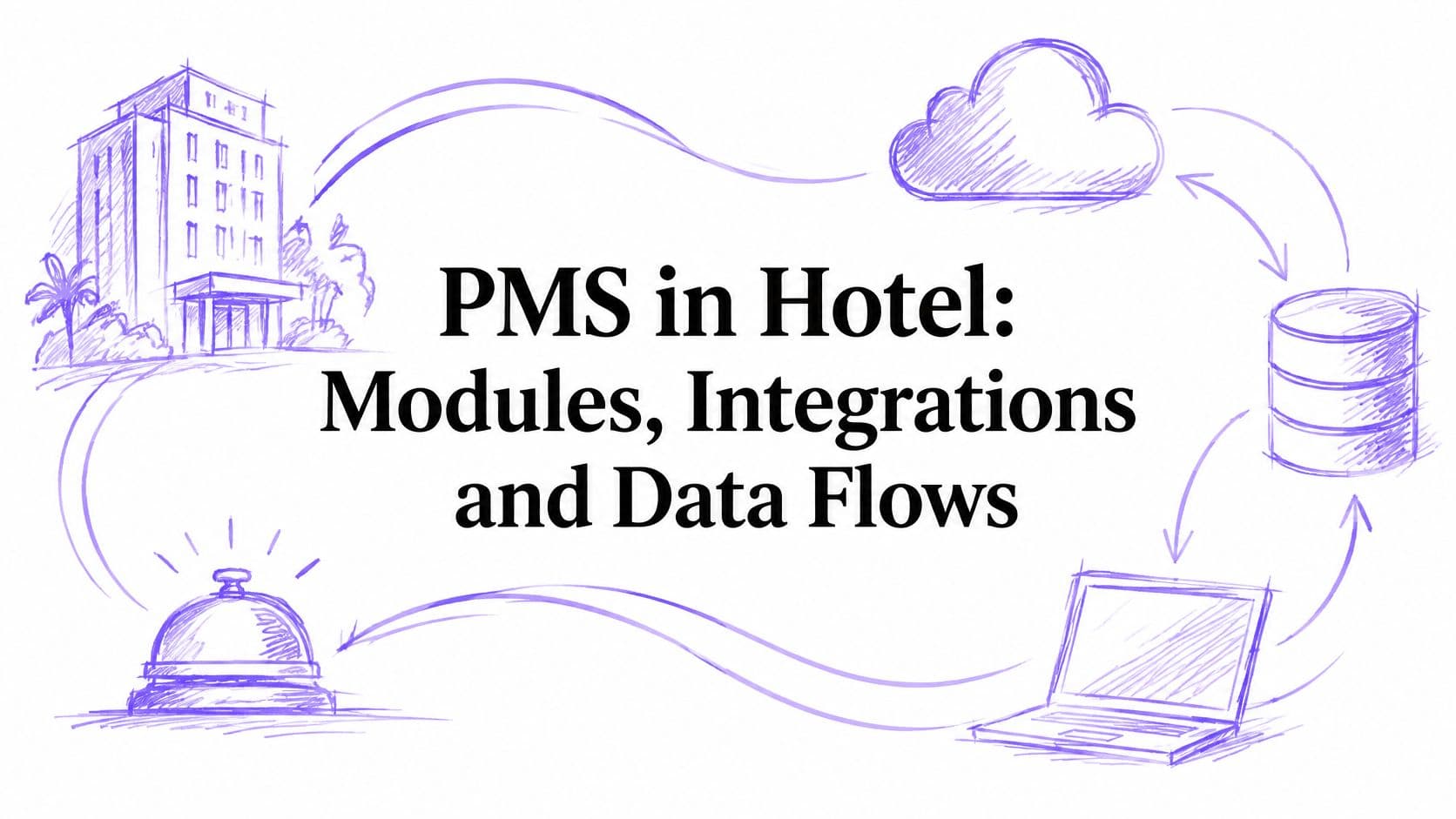
Learn what a PMS in hotel operations does, how its modules and integrations connect, UK GDPR safeguards and a practical rollout checklist.
London occupancy reached 87% in the third quarter of 2024, its highest quarterly result since the third quarter of 2018, according to the Knight Frank UK Hotel Dashboard for the third quarter of 2024. Regional UK hotels recorded approximately 82% in the same period, and upper-upscale London properties reached 89%. At that utilisation, a PMS in hotel operations isn't a bookings diary. It's the system that decides what's sellable, who's arriving, which room is clean and what a guest owes. If that picture is wrong, every connected system, from guest WiFi to payments, acts on the wrong facts.
England's room occupancy reached 85% in July 2024, the highest monthly result reported for that year, and year-to-date occupancy reached 77% by the end of August, according to the VisitBritain England Occupancy Survey. July 2024 also compared with 79% in July 2019, so demand had moved past comparable pre-pandemic monthly levels. When that many rooms turn over each day, one stale availability figure can sell rooms you don't have.
A property management system, or PMS, is the hotel's operational system of record. It's the one place where rooms, reservations, guests, rates and charges are held together and kept consistent.
Think of the PMS as an air traffic control tower. Arrivals, departures and room moves all pass through it. The booking engine, housekeeping app, point of sale and door locks are aircraft that depend on the tower's picture being right.
That analogy explains a common confusion. A channel manager distributes rooms. A payment gateway takes money. Neither decides what's true inside the hotel. The PMS holds that decision, and other systems read from it or write back to it.
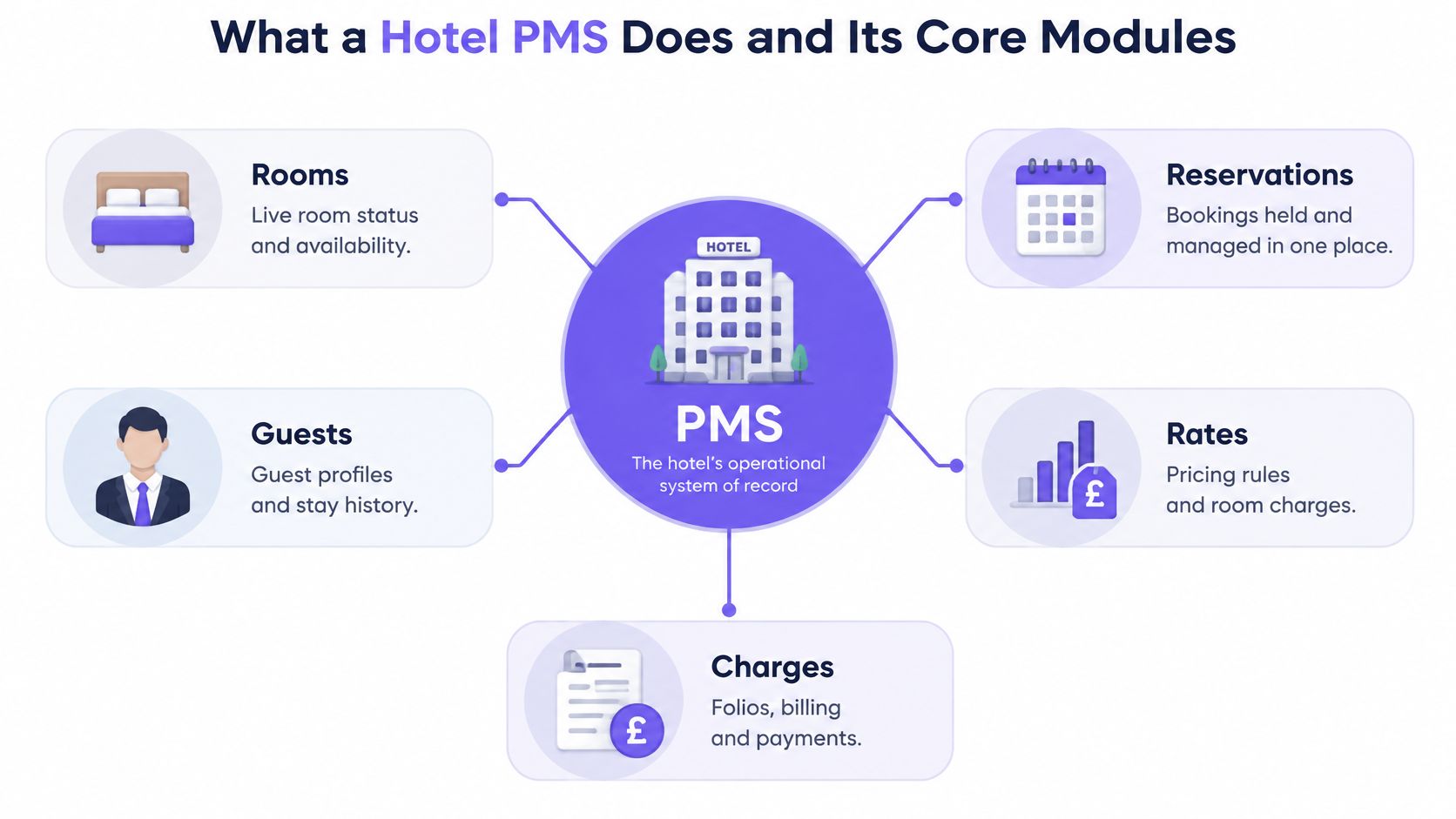
| Module | What It Controls | Connects To |
|---|---|---|
| Reservations and availability | Room inventory, booking dates and stay status | Booking engine, channel manager |
| Front desk | Check-in, check-out, room assignment and key issue | Door locks, ID scanning |
| Housekeeping and room status | Clean, dirty and out-of-order states | Housekeeping app, maintenance log |
| Guest profiles | Contact details, preferences and stay history | CRM, marketing tools, guest WiFi |
| Billing and folios | Room charges, extras, payments and invoices | POS, payment gateway, accounting |
| Rates and distribution | Rate plans, restrictions and availability sync | Revenue tools, online travel agencies |
| Reporting and night audit | Daily totals, occupancy and day close | Finance and business intelligence |
Reservations and availability protect inventory first. If the PMS blocks the last king room for a direct booking, the channel manager shouldn't still be selling it through an online travel agency.
Front desk and housekeeping then handle the physical reality. A room can be reserved but not ready, ready but not assigned, or occupied but due a service clean. Those are different states, and staff suffer when a system collapses them into one vague status.
Behind those guest-facing modules sits staff administration, including rotas and joiner and leaver records. Teams that need that side joined up often look at HR management information systems for UK teams so people data isn't rekeyed between systems.
For hospitality partners building services around that core, Purple's hospitality sector work covers hotels, restaurants and pubs using guest WiFi and POS integrations. The point isn't to replace the PMS. It's to connect access and engagement tools to the record the PMS already owns.
Practical rule: If a change in one module forces manual entry in another, the PMS isn't doing its job and the hotel pays for the gap in staff time.
That test is simple and unforgiving. A cancellation should free inventory, adjust a folio expectation and update forecasts. If a receptionist has to visit three screens to make those things agree, you've bought software but kept the manual process.
Say a guest books two nights through an online travel agency on Tuesday evening. That single action triggers a chain of dependent steps, and the chain only works if each step writes back cleanly.
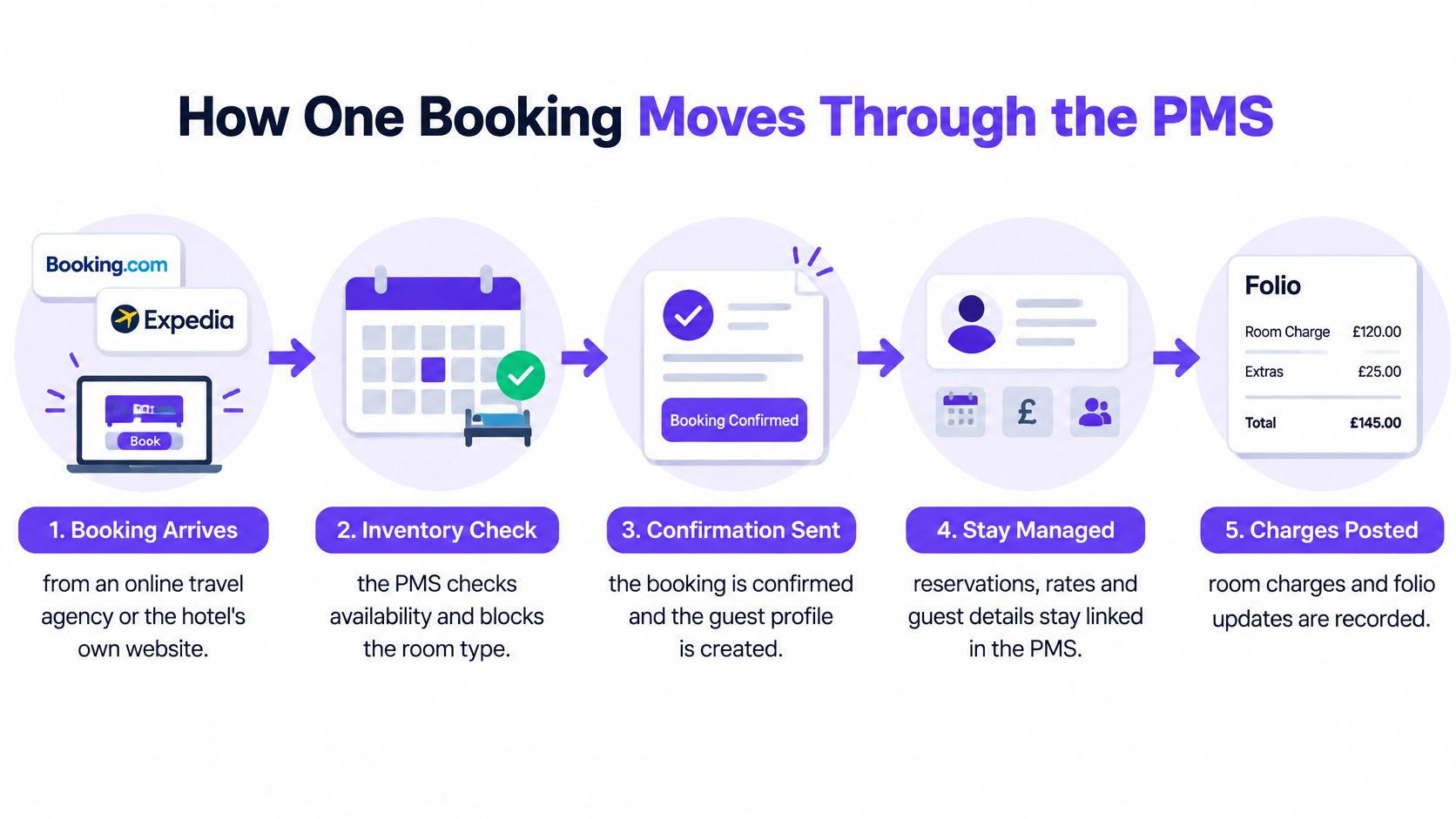
Notice the order. Inventory is checked before confirmation, not after. Hotels that confirm first and reconcile later create the overbookings they then have to apologise for.
Flexibility matters to guests here. In a 2023 survey of 1,000 UK travellers for Agilysys's UK Hospitality Impact Study, 61% said flexibility to manage their hotel stay through staff or technology was important, as reported in the Boutique Hotel News summary of the Agilysys survey. Self-service only works if it writes to the same record the front desk uses.
Now the failure. A housekeeper cleans room 214 and marks it clean in the housekeeping app, but that status never writes back to the PMS. The front desk sees a dirty room on a busy arrival day, or worse, someone overrides the status and checks a guest into a room that hasn't been serviced.
That discipline saves hours. You're looking for the exact link that failed, not a general sense that the system is playing up.
A PMS in hotel use shouldn't be judged as an isolated reservations database. The Access Group guide to choosing a hotel PMS describes the PMS coordinating reservations, check-in and checkout, housekeeping, guest profiles, invoicing, reporting, booking engines, channel managers, revenue tools, point of sale, payments and staff systems. That makes it an integration layer, and integration layers fail in predictable ways.
The main risk is stale data. If availability, room status, rates or folio charges move through delayed or non-standard interfaces, staff act on old records. Overbooking, manual reconciliation and billing errors follow.
An API lets one system request or update a record in another. The channel manager asks the PMS how many rooms remain, gets an answer, and sells against it. That request and response model suits lookups and scheduled syncs.
A webhook pushes an event the moment it happens. When housekeeping marks a room clean, the PMS notifies subscribers instead of waiting for them to ask. That suits status changes, where minutes of delay cause front-desk confusion.
Single sign-on with automated provisioning handles people. A directory creates staff accounts when someone joins, often using SCIM to push identity changes, and revokes them when they leave. Without it, accounts drift and former staff keep access nobody remembers granting.
For guest WiFi, the PMS passes the room number and stay dates so access starts at check-in and expires at checkout. Partners evaluating that link can review Purple's guest WiFi approach alongside the PMS vendor's field mappings. Purple's platform includes Purple Access for venue WiFi, Purple Shield for content filtering, Purple Engage for guest marketing and Purple Act for running the business from its own data.
| Integration Point | Data Exchanged | Typical Method | Risk if It Lags |
|---|---|---|---|
| Booking engine and channel manager | Availability, rates and bookings | API and webhooks | Overbooking from stale availability |
| Guest WiFi platform | Room number, stay dates and opt-in status | API with directory or RADIUS link | Guests on the wrong network or access not revoked at checkout |
| Staff WiFi and directory | Staff accounts, roles and access levels | Single sign-on and SCIM provisioning | Leavers keep access after departure |
| Point of sale | Charges for folio posting | Charge posting API | Missing or duplicated charges |
| Payment gateway | Payment tokens and authorisation status | Hosted payment API | Folio and processor totals disagree |
| Door locks | Room keys and stay dates | Lock vendor API | Keys still valid after checkout |
One segmentation rule overrides convenience. Guest WiFi should sit on a network isolated from PMS and payment environments. A compromised guest device shouldn't have a route to folio or card data, however tidy a flat network looks on a diagram.
Two systems being connected tells you nothing. Measure message success, propagation delay and how many transactions staff still correct by hand.
Ask about standards too. Hotel Technology Next Generation, or HTNG, interface standards define reusable methods for hotel-system communication, reducing bespoke work. When a vendor can't say which standards its interfaces follow, you're likely buying custom glue you'll maintain forever.
Start with the card-data rule. You don't copy full card details into the PMS, the ePOS, the CRM or the WiFi platform. Every extra copy adds a system and a set of accounts you must protect, and it widens the damage if one of them is breached.
The Lightspeed guide to hotel PMS and point of sale sets out the safer pattern. Tokenise payments at the processor, store only the minimum transaction reference and masked details in the PMS, encrypt data in transit and at rest, apply role-based access and keep immutable access and change logs.
For each data type, document why you hold it, how long you keep it, which processor handles it and how a guest exercises access or deletion rights. A folio kept for accounting has a different retention reason from a marketing preference. Treating them the same creates either unlawful retention or records you can't produce when finance needs them.
Apply data minimisation to forms and surveys. Collect only what you'll use, and let guests volunteer optional details rather than requiring everything at sign-up. We support that pattern ourselves, since clients can use guest WiFi custom fields to collect information guests volunteer and run surveys to gather real-time feedback. Volunteered data is easier to justify, and usually more accurate, than forced fields guests fill with nonsense.
Automate account deprovisioning so disabling a directory account ends PMS and WiFi access. Review privileged access on a cycle, rotate API keys, patch promptly and test backups by restoring them. A backup you've never restored is a hope, not a control.
Then write the incident playbook before you need it. Name who investigates, who notifies the regulator and guests, and when. During a breach, staff shouldn't be debating ownership while the clock runs.
Before you sign or integrate, demand a data-flow diagram and evidence that payment boundaries hold. If a vendor can't show where card data stops, assume it travels further than it should.
Labour economics decide whether PMS automation earns its keep. The Gravita analysis of UK hospitality costs reports a 6.7% increase in the National Living Wage to £12.21 per hour for workers aged 21 and over, employer National Insurance rising from 13.8% to 15%, and staff wages at about 35% of operating expenses. That gives repeated rekeying a measurable cost.
Manual administration absorbs substantial staff time, while delayed action can leave revenue opportunities unclaimed. Integration creates the saving. A booking change that updates availability, billing and guest WiFi in one flow removes several follow-up actions; if one update waits for a person, the work returns as checking and correction.
Give each metric a source system and an owner. A reported saving should be traceable to a changed workflow, with errors counted wherever they reappear.
At £12.21 per hour, one recurring hour removed for one worker is £12.21 each week in direct wage cost, before employer on-costs. Multiply the weekly hours removed by the workers affected and the weeks measured. Model revenue separately through recovered upsells, quicker room returns and fewer billing corrections.
That method also shows where savings fail. A receptionist may stop copying booking details yet still update WiFi access or check payment status in a second console. The handoff has moved into the integration layer, so the saved labour should not be counted.
Be honest about the counterfactual. If saved hours are spent reconciling stale room statuses, duplicate profiles or failed payment updates, the labour has moved into another queue. A polished PMS surrounded by disconnected WiFi and payment tools can preserve the same manual work.
For channel partners, an outcome-based model makes the value easier to prove. Agree baseline metrics before deployment, then package identity-based WiFi and secure network access around the PMS. A guide to how partner programs drive business growth is useful background on structuring shared accountability, while Purple's partner benefits sets out one route into that model. Purple Partners is the channel programme for resellers, MSPs and systems integrators selling identity-based WiFi solutions. Partners who can show fewer corrections and faster room turnaround sell an operational result.
Treat selection as governance, not a feature beauty contest. Recent UK-focused reporting on smart hotel technology and cybersecurity notes that connected hotel technology can link the PMS with door access, room booking, building controls, networks and third-party services. Each integration buys efficiency and sells a little more of your control in return. The more systems exchange guest and payment data, the more places that data can go stale and the more doors an attacker can try. Your checklist has to manage both sides of that trade-off.
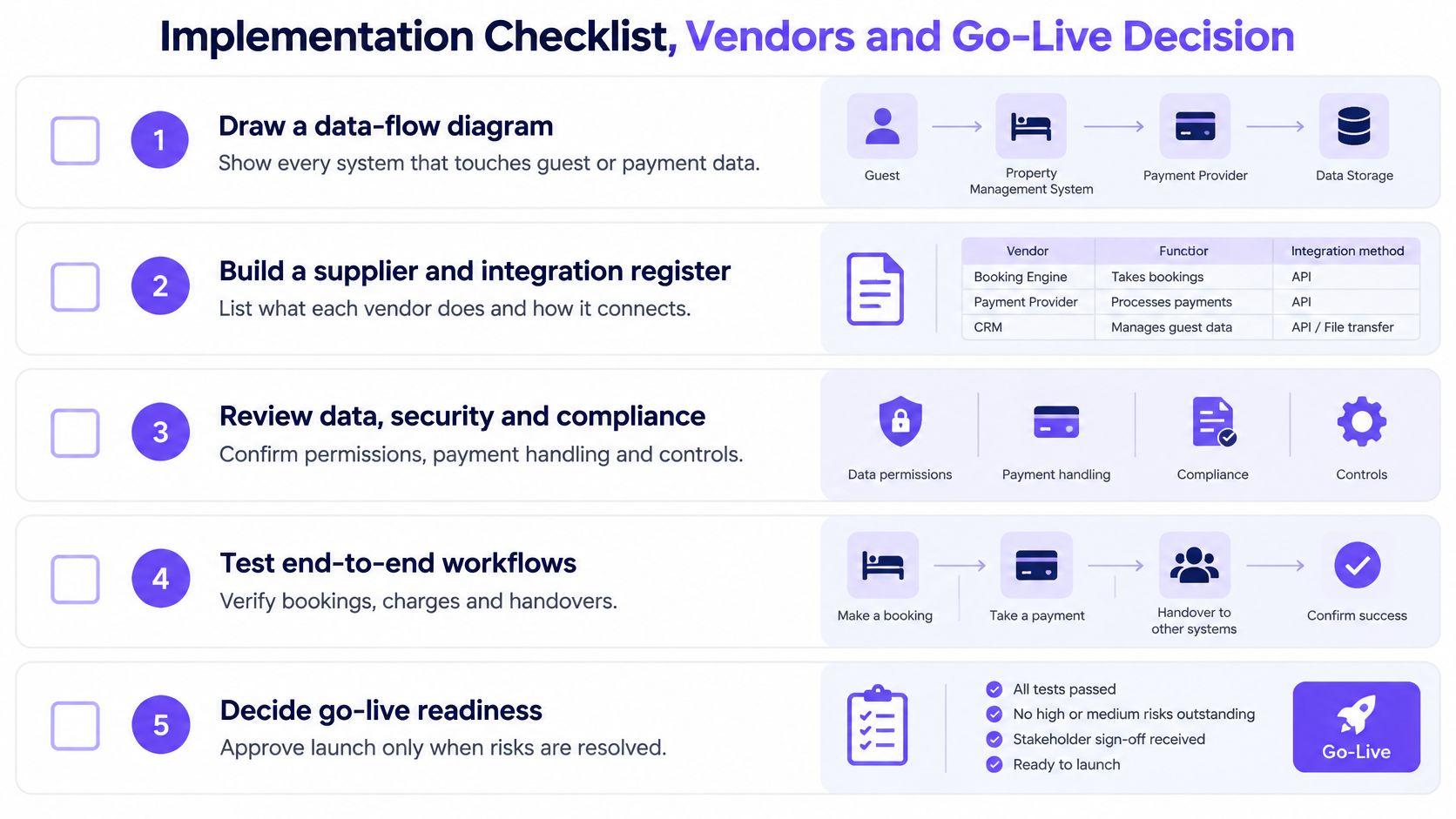
Step two deserves emphasis. A register that only lists vendor names is useless at midnight during an incident. You need access scope, data categories, connected systems and subcontractors on one page, owned by a named person who updates it every time an integration changes. When a payment token stops matching its booking, that page tells you who to call before the queue at reception tells you something is wrong.
Cloud hosting removes the local server burden. The vendor patches and updates centrally, staff can work away from a fixed desk terminal, and multi-property reporting is usually simpler. Your dependency shifts to connectivity and to the vendor's resilience, which is why offline behaviour needs a live demonstration, not a slide.
On-premise keeps working on the local network during an internet outage. It also makes your hotel responsible for hardware, backups, monitoring and security updates. Independence from the internet isn't independence from technical work. A single unmonitored server with untested backups is its own risk.
Ask either type of vendor the same awkward questions. Can staff check guests in and out during an outage? Are conflicts surfaced when data syncs back, or overwritten without notice? How do you export reservations, profiles and folios in a machine-readable format if you leave? Weak answers here cost more than a missing report template.
| Vendor | Evidence |
|---|---|
| Oracle OPERA Cloud | Listed as the PMS at Premier Inn Hotels Limited in 2024 |
One sourced example is worth more than a long list of unsourced names. The Apps Run The World hotel property-management adoption database listed Premier Inn Hotels Limited, a UK-based hotel company with approximately 40,000 employees, as using Oracle OPERA Cloud PMS in 2024. Scale at one operator doesn't prove fit for a 40-room independent.
Compare every candidate against the checklist instead of a reputation. Ask each to run your highest-volume workflows with realistic data. Watch a receptionist process a room move and a split folio. Ask housekeeping to update status on the device they will carry. Errors that surface in a demo will multiply on a Saturday changeover.
Happy-path testing catches almost nothing. Send the same booking message twice and confirm idempotent updates create one reservation, not two. Cancel a booking while a channel update is delayed. Move a guest mid-stay, split the folio between two payers, then pull the network cable and keep checking guests in.
Record results against the measures from step six. A failed message that retries and lands is a pass. A failed message nobody notices until a guest complains is a defect, even if the interface is technically connected.
Proceed only when steps 1, 3 and 4 are documented and offline mode is tested. Anything missing goes to the vendor in writing, with an owner and a date.
Run a 30-day pilot on one property or one floor. Review the audit log weekly with the people who work the shifts, not only project staff. Set the go-live threshold in advance, such as a low share of transactions needing manual correction, and hold it even when launch pressure builds. A threshold agreed calmly in a meeting is easier to defend than one invented after a bad first weekend.
Before signing, map which integrations you own and which the hotel's PMS vendor owns. When a charge goes missing at midnight, accountability must already be assigned. Purple Partners is the channel programme for resellers, MSPs and systems integrators selling identity-based WiFi solutions, and partners in that position should name their boundary plainly. They own secure access around the PMS. The PMS vendor owns the record. Confusing those roles is how faults bounce between suppliers while the front desk copes.
One last check on data exit. Test a sample export during evaluation and open the files. If guest history arrives as unreadable PDFs, your next migration is already compromised.
A room sold twice is the symptom staff notice first. It usually traces to stale availability, a delayed channel update or a duplicate booking message applied as if it were new. Don't start by blaming the channel. Start with the audit log and confirm which message the PMS received, in what order, and what it did with it.
| Symptom | Likely Cause | Fix |
|---|---|---|
| Same room sold twice | Stale availability or a duplicate booking message | Replay the retry queue, enable idempotent updates and reconcile availability daily |
| Room shows dirty at check-in | Housekeeping app not writing status back to the PMS | Check the webhook status, update the room manually and re-test the sync |
| Guest cannot join WiFi after check-in | Room number or stay dates not passed to the WiFi platform | Verify the field mapping and re-run the sync for that room |
| Former employee can still log in | Deprovisioning not triggered when the account was disabled | Check the directory link, revoke active sessions and audit recent logins |
| Charges missing from folio | Point-of-sale posting failed or timed out | Replay failed postings and check the audit log for the timeout |
| Payment totals do not match | Duplicate transaction or token not matched to the booking | Reconcile against the processor report and check transaction keys |
| PMS unavailable at the front desk | Network or cloud outage | Switch to offline mode, reconnect and reconcile before the next night audit |
Some fixes land the same day. Replay failed messages from the retry queue, check whether a webhook endpoint is returning errors, and re-run the sync for a single room to prove the mapping works. Those actions restore service and, just as usefully, prove which layer failed.
Others need a week of monitoring. Tightening deprovisioning rules requires a review cycle to confirm no leavers still hold access. Reconciling folios against the processor's daily report needs several closes before you can tell a one-off mismatch from a recurring defect.
That order matters because a fix applied to the wrong layer masks the actual fault. Manually correcting availability every morning makes the dashboard look healthy while the channel feed stays broken.
Most sync problems reduce to three causes. A message never arrived, a message arrived twice, or a message was applied out of order. If you can say which one happened, you're most of the way to the fix.
Your PMS already knows who is checked in, which room they're in and when they leave, so put that record to work by tying guest and staff WiFi access to real identity rather than shared passwords. Visit Purple to see how partners build secure, identity-based WiFi around the hotel systems clients already run, and bring your integration register so we can map the first connection together.
Join 80,000+ venues already running on Purple. No targets, no minimums, just bigger deals.