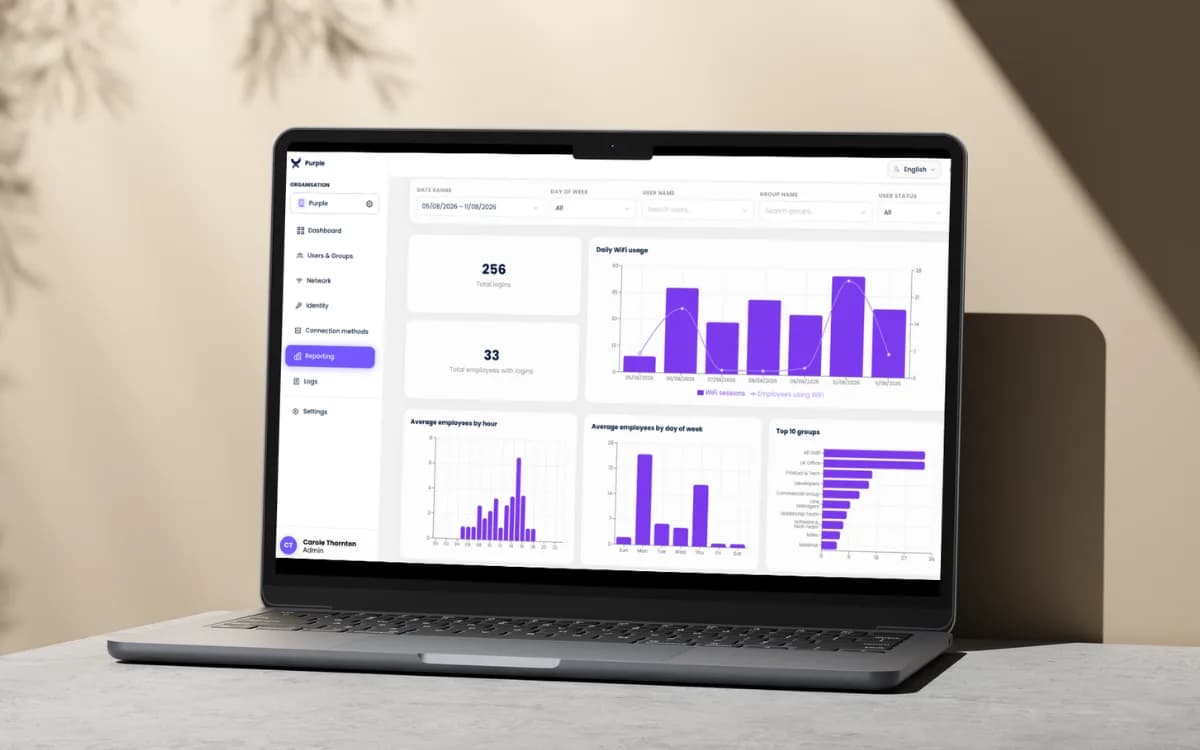
How Many Devices Are Connected to the Internet in 2026?
How many devices are connected to the internet? See current estimates, UK figures, how counts are measured and what they mean for capacity and security.
A practical guide to wifi solutions for businesses covering guest, staff and multi-tenant networks, UK security, ROI and partner migration.
The customer's internet connection is working, the access points look healthy, and someone still can't connect. Meanwhile, a contractor who finished last week can join the staff network from the car park. You're being asked to quote better WiFi, but the core issue isn't just coverage. It's who gets access, what they can reach, and whether that access ever ends.
For MSPs, resellers and integrators, WiFi solutions for businesses should be a managed access service, not another box sale. Start with identity and the customer's operational needs. Then choose the radios, authentication and commercial model that support them.
The first-call decision isn't which access point to install. It's which people and devices the premises must serve, and what each group should experience.
Quoting a single network before answering that question is how projects get redesigned after installation. A resident needs their television and phone to work together. A visitor needs internet access without seeing office printers. An employee needs access that follows their employment status, not their knowledge of a password.
Mark the personas before you size the network. They describe different access relationships, not necessarily different hardware estates.
| Solution | Who it serves | Access model | What stays private | Partner value |
|---|---|---|---|---|
| Staff WiFi | Employees and managed devices | Passwordless 802.1X or certificate via directory and MDM | Corporate apps, printers and internal VLANs | Recurring managed access and same-day offboarding |
| Guest WiFi | Visitors and customers | Friction-light onboarding with client isolation | No route to staff systems or other guests | Footfall, return rate and repeatable insight tiers |
| Multi-tenant WiFi | Residents in housing, hotels and MDUs | Private network per unit, at-home experience | Neighbour traffic and building-management systems | Per-unit service the landlord can brand |
For staff WiFi, make the directory the authority for access and use mobile device management, or MDM, to deliver the configuration. Intune, Jamf or JumpCloud can form part of that provisioning workflow, subject to the chosen authentication platform's integration. The employee shouldn't need to discover, type or share a workplace password.
Don't confuse a certificate with a complete lifecycle, though. Establish how enrolment, renewal, lost-device handling and account disablement work together. A certificate that remains accepted after the employee leaves is a more advanced version of the old shared key.
For guest WiFi, remove avoidable onboarding friction without removing isolation. Measure successful connections and useful visitor behaviour, rather than treating every captured email address as a commercial result. Define what footfall and return rate mean before selling an analytics package, and separate access from optional marketing permissions.
A hotel makes the distinction obvious. Back-office employees need controlled access to business applications, lobby visitors need straightforward browsing, and long-stay residents need personal devices to behave as though they're at home.
Putting all of them behind a common guest portal doesn't solve those needs. Nor does applying office-style client isolation everywhere, because residents may legitimately want their own devices to communicate.
One building needs different kinds of key, not different brands of the same lock.
For multi-tenant networking, define the private boundary around the unit or household. Permit intended communication inside that boundary, while preventing access to neighbouring units and building systems. Include arrival, room changes and departure in the design, not just initial connection.
During the walkthrough, annotate rooms and shared areas with the personas present. Ask who owns each access decision, who handles support, and what event should terminate access. Only then should you scope radio coverage, switching and hardware.
The staff and guest networks have different names, so the customer assumes security is handled. On the shop floor, however, the leased line is up while the till, laptop and visitor phone still struggle to connect. Separate names prove very little about either service quality or access control.
Broadband is the water main; WiFi is the taps. A healthy supply entering the building doesn't guarantee that every tap delivers what people need.
In Ofcom's 2022 SME communications research, 83% of SMEs said they couldn't function as a business without communications services, while 11% reported problems connecting to WiFi. Those findings justify treating wireless access as operational infrastructure, not a complimentary extra.
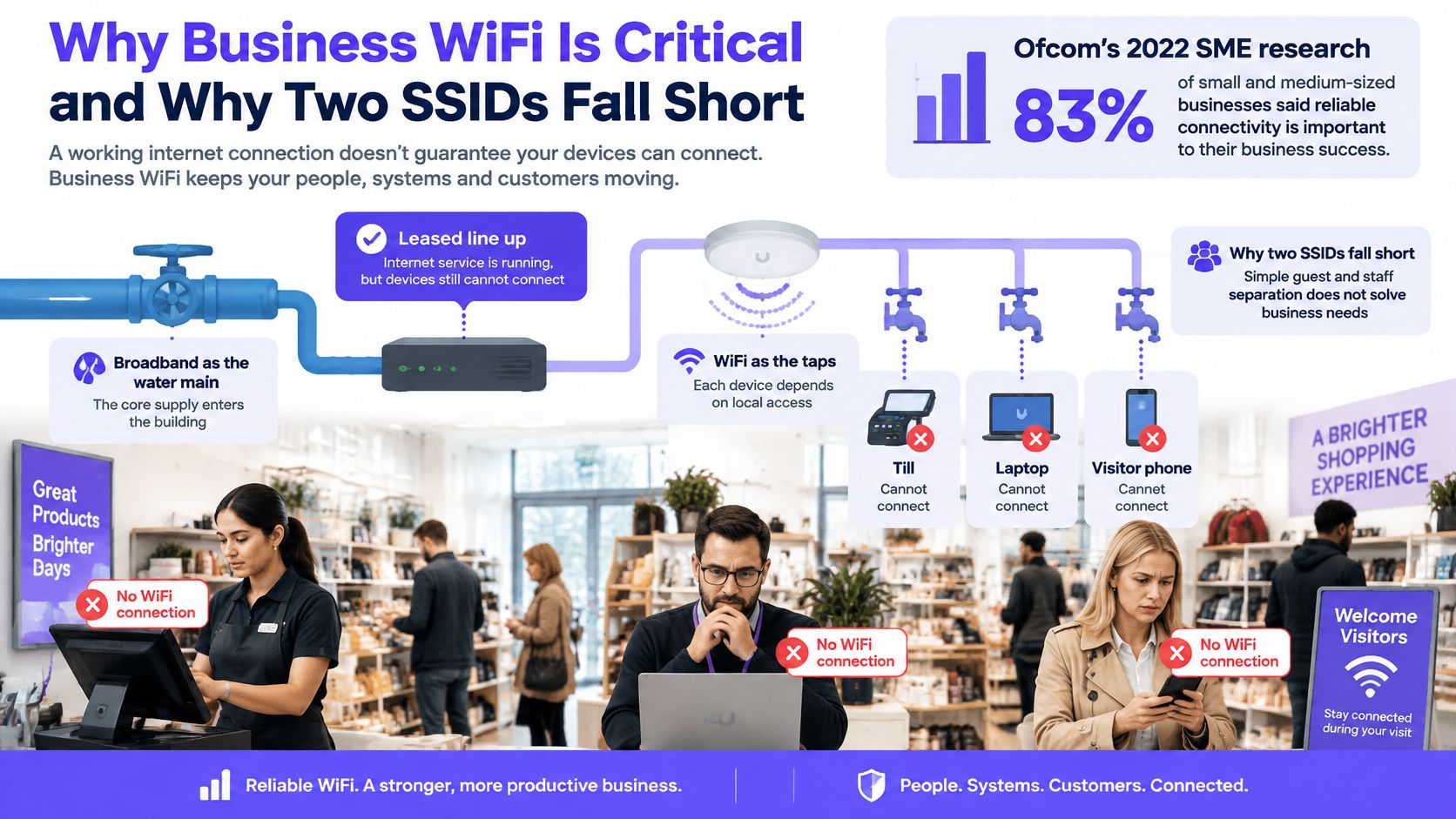
A strong signal doesn't prove that authentication, address allocation or application access works. A user can sit beneath an access point and still fail to obtain a usable connection.
Troubleshoot the complete path: WAN capacity, radio contention, access-point placement, switching, authentication, segmentation and monitoring. Buying a faster circuit won't fix an overloaded radio channel or a broken certificate profile.
For partners, that distinction changes the service conversation. Instead of promising coverage alone, specify what a successful connection looks like for each role and which applications must remain usable during busy periods.
The UK Cyber Security Breaches Survey 2025 found that 43% of businesses experienced a breach or attack during the previous twelve months, while 30% used user-monitoring controls. These aren't WiFi-specific breach figures, but they establish the wider risk context in which wireless access operates.
Consider the ordinary exceptions that accumulate around a shared password. A departing employee remembers it. A contractor passes it to a colleague. An unmanaged laptop joins without anyone checking whether its owner still has a business reason to connect.
Adding another SSID doesn't answer those questions. Identity lifecycle does: someone must own the joiner, mover and leaver decision, and the network must enforce it.
The access policy should use current directory status, recognised device credentials and the user's permitted role. Device posture checks, where supported, should affect authorisation rather than merely appear in a dashboard. Logs should connect the identity, device, policy decision and subsequent changes.
Certificate-based authentication also needs careful revocation design. Disabling a directory account doesn't automatically invalidate every certificate or terminate an established wireless session. The platform must connect those events through an enforceable policy, with session termination or reauthorisation where needed.
Acceptance test: Disable a test leaver's account and prove that both a fresh connection and an existing session lose access within the agreed offboarding window.
If HR disables the account at close of business, the MSP shouldn't need a site visit or a building-wide password change. That's the difference between naming a staff network and controlling staff access.
Score the platform against the customer's live environment, not the brochure's maximum throughput. Ask the supplier to demonstrate the awkward cases: a disabled account, an expired certificate, an unavailable authentication service and a guest attempting to reach an internal printer.
The NCSC's Cyber Essentials infrastructure requirements include wireless access points and controllers within scope when they can communicate with other devices through the internet. In-scope equipment needs appropriate firewall protection, secure configuration and maintained software, not just a reassuring cloud dashboard.
| Criterion | What good looks like | Walk away if |
|---|---|---|
| Identity lifecycle | Per-user or per-device access revoked from the directory the day it should end | Staff still share one passphrase |
| Encryption and authentication | WPA2-Enterprise with AES or WPA3-Enterprise, 802.1X and RADIUS | Only WPA2-Personal is on offer |
| Segmentation | Separate staff, guest and tenant domains plus client isolation appropriate to each role | Guests can reach printers or each other |
| Operations and Cyber Essentials | Firewall protection for internet-connected APs, patched firmware, isolated management plane | Controller is exposed and unpatched |
| Partner model | Hardware-agnostic, white-label, fast deployment, no minimum commitment. Purple is one cloud-overlay option offering staff, guest and multi-tenant services with partner enablement, deal registration, training and support | Forced hardware swap or vendor owns the customer |
| Evidence | Logs of who connected, on which device, and when access changed | A splash page with no audit trail |
An overlay doesn't replace the firewall, switch configuration or firmware programme beneath it. Identify which supplier owns each control, and put that responsibility into the service description. Otherwise, every incident becomes a discussion about whose dashboard looked healthy.
Treat the office network as an untrusted transport. Keep application traffic encrypted, apply deny-by-default inter-domain rules, and restrict controller administration to authorised management paths.
Ask for a working demonstration of certificate delivery through the customer's MDM, including server-certificate validation and recovery from a failed enrolment. The certificate-based WiFi via MDM guide is a useful starting point for those implementation questions, not a substitute for testing the proposed combination.
Commercially, favour reuse of supported hardware over a compulsory refresh. Require a clear compatibility statement covering controller model, firmware, authentication features and policy enforcement. Hardware-agnostic shouldn't mean that every important exception appears after signature.
Ask who controls the branded onboarding experience, support communications and renewal conversation. Check how configuration and audit records are exported if the customer changes provider. A white-label portal is of limited value if the vendor still controls the account relationship.
If the answer to the leaver test or the white-label question remains vague, don't proceed to commercial terms.
Say an office manager discovers that a former contractor can still connect. Nobody wants to interrupt the whole team by replacing the staff password, so the exception remains unresolved.
Move the contractor onto individually controlled access with an expiry and a named sponsor. Employees receive managed profiles, while the MSP handles approved role changes and investigates rejected connections remotely.
The employee feels the difference through fewer password requests and more predictable onboarding. The partner attaches managed identity and endpoint support, with an access review as a defined recurring deliverable rather than an informal favour.
In a café, shop or event space, visitors may give up when onboarding asks too much before providing internet access. The venue gets complaints, while marketing receives a list of incomplete registrations.
Use a shorter access journey and isolate visitor devices. Then agree which insights the venue will use, such as repeat visits or busy periods, with clear explanations of measurement limitations and permission choices.
For event operators mapping attendee spaces and activities, the Texas Old Town business venue guide provides useful venue-planning context. Add your own questions about registration desks, presentation areas and guest movement, because those locations determine where connectivity matters.
The attach is guest support and insight reporting. Sell a review that helps the venue make a decision, not an unattended analytics login.
A student moves in and finds unfamiliar devices while trying to connect a games console. A flat communal network has turned an ordinary domestic task into a support and privacy problem.
Give the resident a private network for their unit, with a straightforward way to connect supported personal equipment. Keep their intended device-to-device communication inside that boundary and prevent discovery across neighbouring units.
The landlord can describe the service clearly in the tenancy pack. The partner can attach resident onboarding, branded support and managed switching, with responsibility for moves and departures built into the contract.
A hotel combines office workflows, public spaces and resident rooms, often over the same physical infrastructure. A conference delegate shouldn't inherit room privileges, and a room television shouldn't share a trust boundary with reception systems.
Build distinct service journeys and test them during room changes, checkout and event turnover. Attach property-system integration and room-device support only where the customer has a clear operational owner.
In Ericsson's 2025 UK enterprise connectivity findings, 88% of surveyed UK enterprise technology decision-makers said outdated connectivity restricts the potential benefits of technologies such as artificial intelligence. That isn't a promise of returns from a WiFi upgrade; it's a reason to assess whether staff tools, sensors and connected equipment can use the infrastructure provided.
For the partner, the opportunity is specific: maintain the access service those systems depend on, rather than leave after mounting the radios.
Take the baseline before changing anything. Pull connection-fault tickets, connectivity invoices, offboarding records and the device inventory, then agree how each measure will be counted.
National survey findings establish context, not the customer's starting failure rate. Use the site's own records to determine whether the pilot improves operations, and separate wireless faults from WAN outages or application failures.
| Metric | Source | What it proves |
|---|---|---|
| WiFi connection problems reported | Ofcom SME survey context, compared with local ticket records | Whether the site has a measurable connection problem before the overlay |
| WiFi-related charges increased | Ofcom SME survey context, compared with customer invoices | Whether the customer has identifiable cost pressure |
| Connection faults per month | Site ticket log | Operational stability after cut-over |
| Time from HR disable to WiFi revocation | HR event, directory, MDM and authentication logs | Same-day leaver control, including established sessions |
| Devices on 802.1X rather than shared keys | Controller and MDM inventory | Share of identity-based access |
| Shared-key SSIDs remaining | Migration inventory | Remaining exposure, with retirement as the target |
| Guest footfall and return rate | Guest WiFi analytics | Insight value for marketing |
| Hardware and subscription cost | Partner quote | Total service cost against demonstrated operational savings |
Keep comparable observation windows and record unusual trading conditions. A quiet pilot floor and a busy production floor won't provide a fair comparison without accounting for their different usage.
For guest venues, add weekly observed visits, the agreed return-rate definition and successful onboarding without an email fallback. Don't present detected devices as a perfect count of people: privacy settings, device behaviour and participation affect what the platform observes.
Calculate avoided offboarding visits using the customer's actual history and your quoted visit cost. Add support time saved, then compare those savings with the managed-access fee and any additional subscription or equipment cost.
For housing, track resident tickets per occupied unit and completed unit migrations. For hospitality, separate onboarding complaints from in-room coverage faults so a better portal doesn't receive credit for unrelated radio work.
Count an avoided cost only when the customer would otherwise have incurred it. A theoretical engineer visit isn't a saving.
Keep insight revenue separate from infrastructure savings. The guest WiFi recurring revenue guide can help shape the reporting offer, but the customer still needs a named recipient and an actionable review.
The pilot earns expansion when it demonstrates fewer relevant faults, enforceable offboarding and a service the customer agrees to maintain. Document exceptions as well as improvements, especially devices that can't yet move to enterprise authentication.
Start with the controllers and access points the customer already owns. An overlay isn't a forklift refresh, but reuse must be earned through compatibility testing, not assumed because the equipment broadcasts WiFi.
Keep the pilot small enough to troubleshoot and representative enough to expose real dependencies. Include ordinary staff devices, an awkward endpoint and a genuine offboarding workflow.
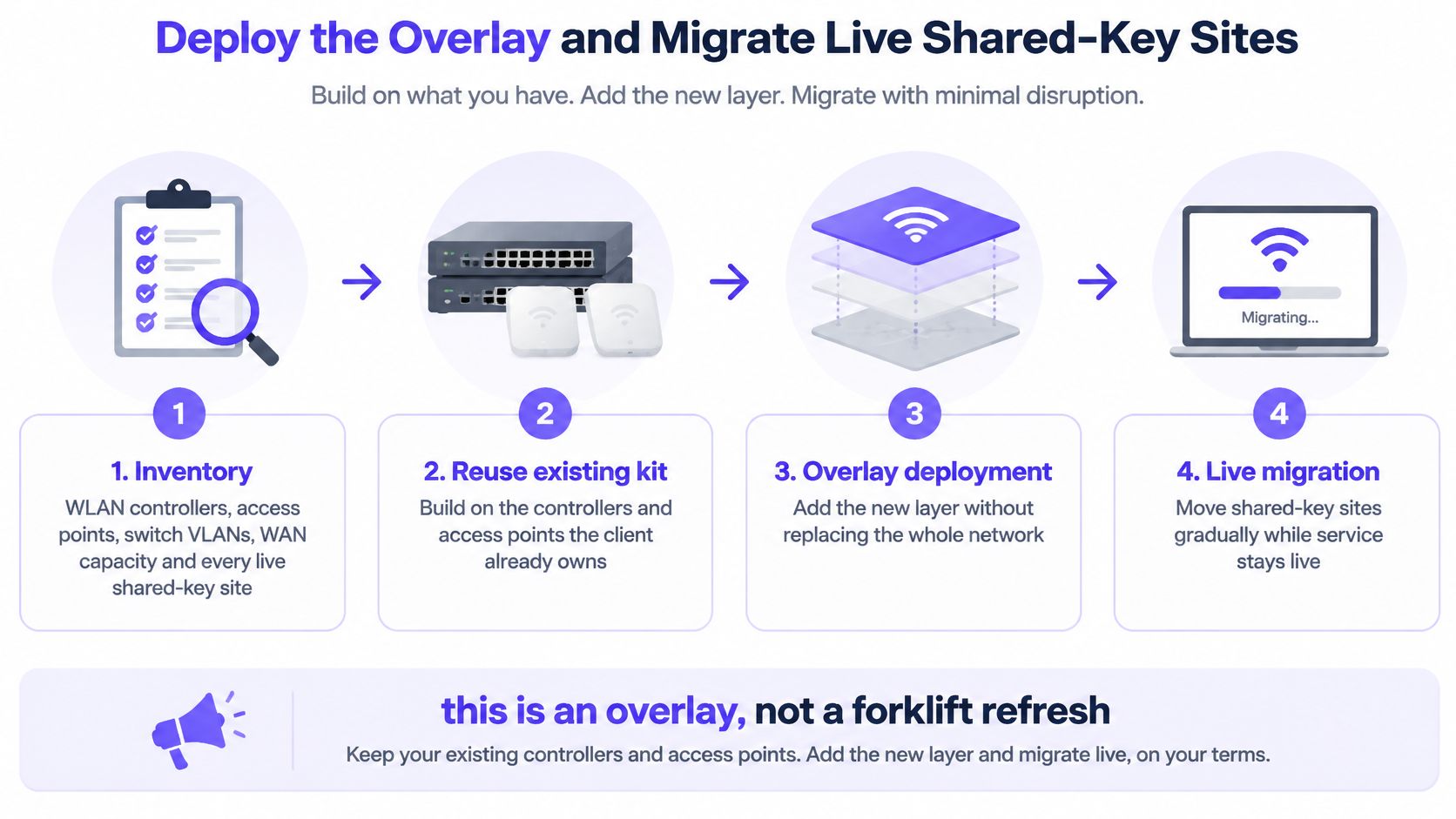
Record controller and access-point models, firmware, licences, switch VLANs, trunk configuration, WAN capacity and every active SSID. Include the forgotten contractor network and any temporary network that somehow became permanent.
Capture the devices using each network, their owner and the applications they require. Store existing keys and vendor credentials in an approved secrets vault, not in the migration spreadsheet.
A controller that can't support the required authentication or enforcement needs a hardware discussion. Don't weaken the access design to preserve an unsuitable device.
Map staff, guest and tenant roles onto appropriate isolated policy domains. Where tenant scale calls for dynamic assignment or private-network features rather than a manually maintained VLAN per room, prove that implementation with the controller supplier.
For enterprise access, configure WPA2-Enterprise with AES or WPA3-Enterprise, using 802.1X and RADIUS. The GovWifi technical requirements specify enterprise wireless support, controller connectivity to RADIUS, public-IP reachability and UDP port 1812 for authentication requests.
Use redundant RADIUS services and test failover instead of merely entering backup addresses. Restrict permitted traffic to the documented endpoints and check how the controller behaves when authentication is unavailable.
Provision certificates or profiles through the directory and MDM workflow. Configure clients to validate the authentication server's certificate and expected identity; don't train users to dismiss certificate warnings.
Then connect account and device lifecycle events to authorisation. Test revocation, certificate renewal and lost-device handling separately, because they're different operational events.
Enable guest client isolation and block visitor access to internal applications, printers and management interfaces. For tenant networks, preserve approved communication within the resident's private group while blocking neighbouring groups.
Use explicit firewall rules rather than assuming a VLAN alone prevents communication. Test permitted and prohibited destinations from real client devices, including discovery traffic used by televisions and casting equipment.
Keep controller administration separate from ordinary user access. Record the firmware owner, patch process and maintenance window, and check for rogue access points during the pilot.
Freeze new shared-key distribution before the pilot. Assign every legacy dependency an owner and a migration decision, rather than allowing it to disappear into an exception list.
Run the new staff service alongside the old network for a defined overlap, with a dated removal window. Use controller records to find remaining legacy clients and contact their owners before cut-over.
For housing and hotels, migrate by a manageable building or floor and provide clear resident instructions. Check personal-device discovery within each unit, not merely whether a phone can browse the internet.
Some headless equipment may require individually controlled keys or a restricted exception network. Keep those exceptions separate from staff access, document the reason and define how credentials are revoked. A realistic migration target is the removal of unmanaged shared access, not pretending every endpoint supports 802.1X.
The open-to-secure migration guide can support the change plan. Your runbook should still name the customer's controller settings, support contacts, rollback trigger and final legacy-network removal task.
After cut-over, verify that the retired SSID is disabled and that obsolete administrator access has been removed. Update network diagrams, support scripts and the customer's joiner, mover and leaver procedure.
Assign recurring firmware and access reviews to named people. Train the service desk to distinguish enrolment failures, policy denials and coverage faults so every rejected connection doesn't become a radio ticket.
Register the opportunity through the selected partner programme, complete technical enablement and apply the agreed customer branding. Pick the pilot premises now, put its cut-over date in the change calendar and secure the customer's sign-off on the acceptance tests.
Purple offers a hardware-agnostic cloud overlay for staff, guest and multi-tenant WiFi, with white-label delivery and partner support. Visit Purple to discuss your existing controller estate and scope an identity-led pilot that proves offboarding, isolation and a recurring managed-access service.
Join 80,000+ venues already running on Purple. No targets, no minimums, just bigger deals.