Captive portal login explained for partners
Captive portal login, explained for partners: authentication flow, security and privacy limits, failure fixes, and when to drop the splash page.
Windows Hello for Business explained for UK MSPs: trust models, hybrid Entra setup, PIN fallback, pilots and identity-aware staff WiFi.
The most common advice is to flip Windows Hello for Business on in Intune and call the tenant passwordless. That advice skips the part that decides whether sign-in still works on Monday morning. A PIN prompt is not a deployment. The hard work is the trust model, the hybrid prerequisites, and a PIN policy that does not undo the TPM-backed key.
Say a social-care laptop leaves a council office and tries a file share from a car park. If the trust object was never created, facial recognition succeeds and the share still asks for a password. The user thinks biometrics failed. The directory thinks the device never proved it holds a key. UK MSPs see that split every week on mixed Entra ID and Active Directory estates.
Treat the rest of this as a sequence. Pick one trust model. Prove it on a named pilot. Then design fallback and revocation so a weak PIN, a shared till, or a leaver does not walk the assurance back out of the building.
Turning on passwordless is not a device setting, and Windows Hello for Business is not a prettier password. It is also not the consumer Windows Hello toggle a home PC offers for a local account. It is phishing-resistant, device-bound sign-in for a work identity in Microsoft Entra ID or Active Directory.
What the user sees is ordinary. They type a PIN, or they look at a camera, or they rest a finger on a reader. What the directory checks is different. It checks proof that a private key on that PC was used. The private key does not travel with the gesture, and it does not sit in the password hash store.
Walk the same stolen-secret story three ways.
A stolen password can be typed on any browser, any VPN client, any other PC. Replay is the whole attack.
A stolen Hello PIN is useless on a different machine. The PIN only releases key material that lives on the enrolled endpoint. There is nothing to paste into a phishing site.
A directory breach does not hand over TPM-protected private keys. The attacker may learn a great deal about accounts. They do not receive the hardware-bound credential those accounts use to sign in.
That is the replacement. You stop treating a reusable secret as the thing that opens the estate.
This is written for UK MSPs standardising hybrid customers, for in-house identity teams who own the directory, and for partners who later tie device identity to staff WiFi. The boundary is blunt. Windows Hello for Business is built for individually assigned Windows PCs. It is not a roaming password you can shout across a ward. It is not a guest captive portal.
Practical rule: If the person does not have their own Windows PC, do not enrol them into Hello and hope the policy sorts it out later.
The decision the rollout hangs on is simple to say and easy to rush. Pick a trust model. Prove it with a pilot. Then design fallback and revocation before you widen the ring.
For a hybrid estate, start by assessing Cloud Kerberos Trust. Microsoft's phishing-resistant deployment guidance recommends this approach because Entra-joined and hybrid-joined Windows PCs can access on-premises Kerberos resources without certificate-based trust. You configure Windows Hello for Business policy, establish the trust prerequisites, and let Kerberos provide access to file shares and other on-premises apps. Enterprise PKI is not part of the critical path.
Enrolment still requires preparation. Users complete multifactor authentication while the device provisions, and identity sync, device join state and recovery must be in order before you expand beyond the pilot. For UK MSPs standardising customers with line-of-business apps on Active Directory, these dependencies are part of the design, not tidy-up work for later.
The device model matters too. Windows Hello for Business is designed for individually assigned devices. For kiosks, hot desks or other shared PCs, use a portable credential such as a security key rather than enrolling multiple users and relying on a device-level limit. A personal Hello credential belongs with its user's assigned PC.
Cloud Kerberos Trust is a sensible starting point for hybrid estates, but it is not the right fit for every customer. An existing trust design, or an estate with no remaining on-premises Kerberos resources, may point to another model.
| Model | Best for | Enterprise PKI | Device join | Main limit |
|---|---|---|---|---|
| Cloud Kerberos Trust | Hybrid Entra ID plus on-premises resources; Microsoft's recommended hybrid default | No | Entra-joined and hybrid-joined | Needs Entra Kerberos, MFA at enrolment, and correct sync and join state |
| Key trust | On-premises Kerberos without certificates for the Hello key | No | Hybrid or Active Directory joined | Domain controllers must be prepared for key trust |
| Certificate trust | Estates that already run Active Directory Certificate Services | Yes | Hybrid or on-premises | Certificate lifecycle, templates and revocation stay in the critical path |
| Entra ID only | Cloud apps with no on-premises Kerberos resources | No | Entra-joined | Does not provide access to legacy file shares or Kerberos apps |
Key trust can suit a domain already prepared for it, particularly if the organisation does not want certificates for the Hello key. Its operational work sits with domain controllers rather than a PKI renewal calendar. For a new hybrid deployment, compare it with Cloud Kerberos Trust before choosing.
Certificate trust fits an organisation already running Active Directory Certificate Services and able to manage templates, issuance and revocation. Devices can be hybrid-joined or domain-joined. The commitment is the ongoing certificate lifecycle, not enabling a policy.
Entra ID only suits a pilot where every required app is already in the cloud. Devices are Entra-joined, and no on-premises trust is needed. The trade-off is straightforward: legacy shares and Kerberos apps remain inaccessible through this model.
Choose one row before assigning Intune policy, then pilot that trust model. Mixing trust types across a fleet can leave users able to sign in to cloud apps while failing to reach a file share. It also makes it harder for the help desk to identify which policy applies. If device trust also informs network access, zero-trust principles for network access help clarify what a successful sign-in should permit. Set that boundary before the first user enrols.
Think of a door. The PIN or the face is the hand on the handle. The key in the lock is a private key protected by the Trusted Platform Module. Microsoft Entra ID or Active Directory sits in another room and only receives proof that the right device turned its own key. The key never crosses the corridor.
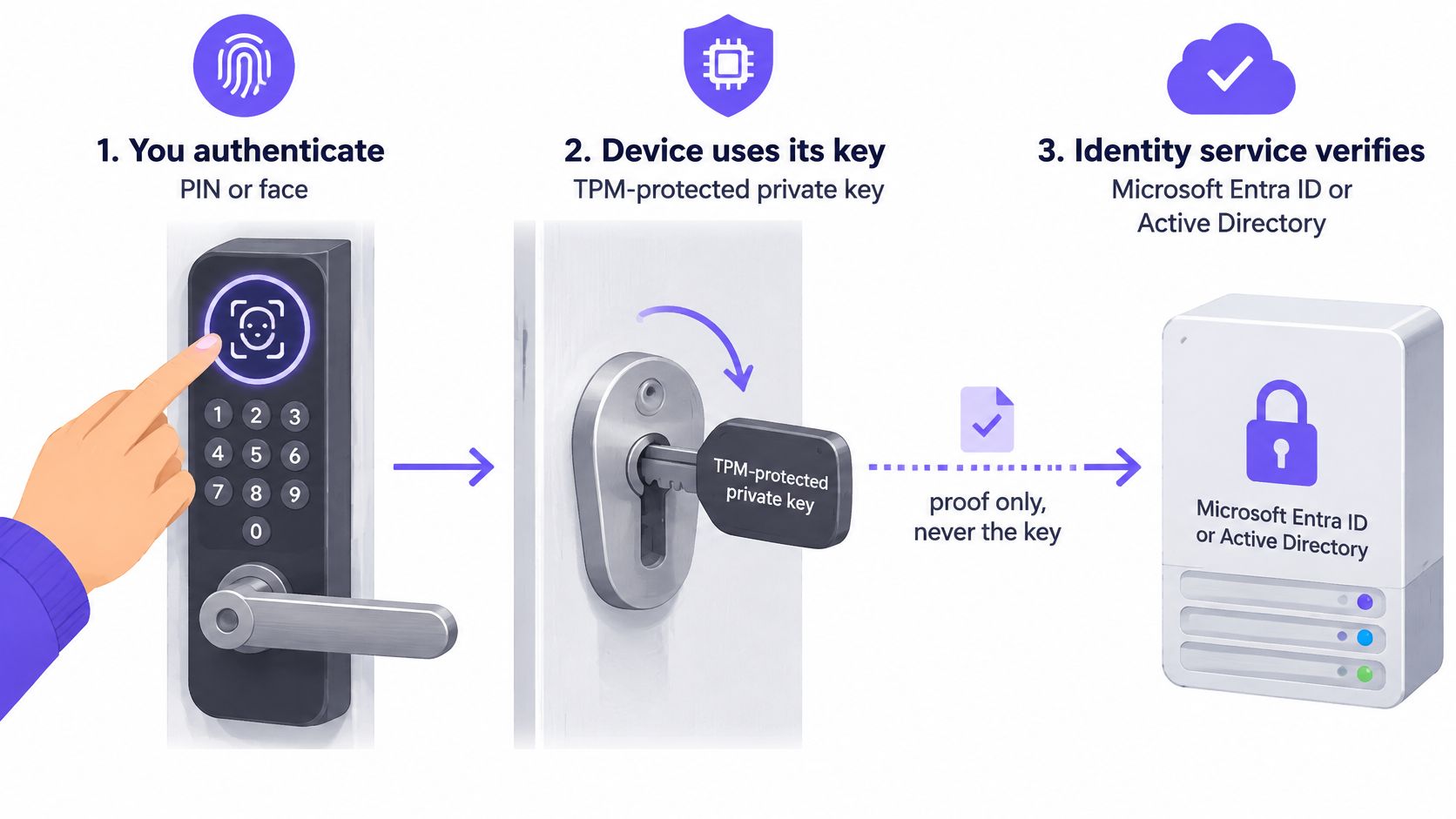
That split is why Windows Hello for Business counts as two-factor authentication. The person presents something they know or something they are. The device presents a hardware-bound key. One factor without the other does not open the account.
Microsoft's passwordless authentication module puts the architecture in plain terms. The key material stays under the TPM. Biometric data stays on the enrolled device. It is not sent to Entra ID, Active Directory, line-of-business applications, or the network. A cloud breach does not become a face-print breach.
Provisioning, at the level an MSP needs to brief a customer, runs like this. The user completes multifactor authentication. The device creates a key pair. The TPM protects the private key. The public key is registered to the user. After that, replaying a password on another machine cannot mint the Hello credential. Stealing the directory password alone does not yield the TPM-protected private key.
The biometric is not a password that gets transmitted.
UK teams should require TPM-capable devices and enforce hardware-backed provisioning wherever the hardware supports it. Then watch Entra authentication-method reports and sign-in logs. Those reports show who enrolled and who is still presenting a password. Exceptions are the backlog, not a rounding error.
The local gesture only opens the credential on that PC. Revocation lives in the directory. When the account is disabled or the device state changes, access policies that follow the directory can drop the user without waiting for the laptop to be handed in. That is the property partners use when staff WiFi is tied to the same identity: central revoke, local access. The gesture never becomes the network password.
Require the TPM in the hardware standard before you promise that property. A laptop that provisions a software key looks enrolled in the report and fails the assurance you described to the customer.
A readiness test is not an Intune toggle. Microsoft's Windows Hello for Business documentation supports both Microsoft Entra ID and Active Directory, offers several deployment models, and treats hybrid cloud Kerberos trust as the simplest recommended model for hybrid organisations. The same guidance still lists the dependencies introductory articles skip. Users must complete MFA during provisioning. Hybrid or on-premises approaches can still depend on enterprise PKI and Active Directory Certificate Services.
In a UK business with a mixed identity estate, the difficult work is certificate lifecycle, Kerberos trust, recovery, remote access, help-desk process, and account-recovery design. Run the gates below per customer. Each gate needs a named owner before anyone schedules enrolment week.
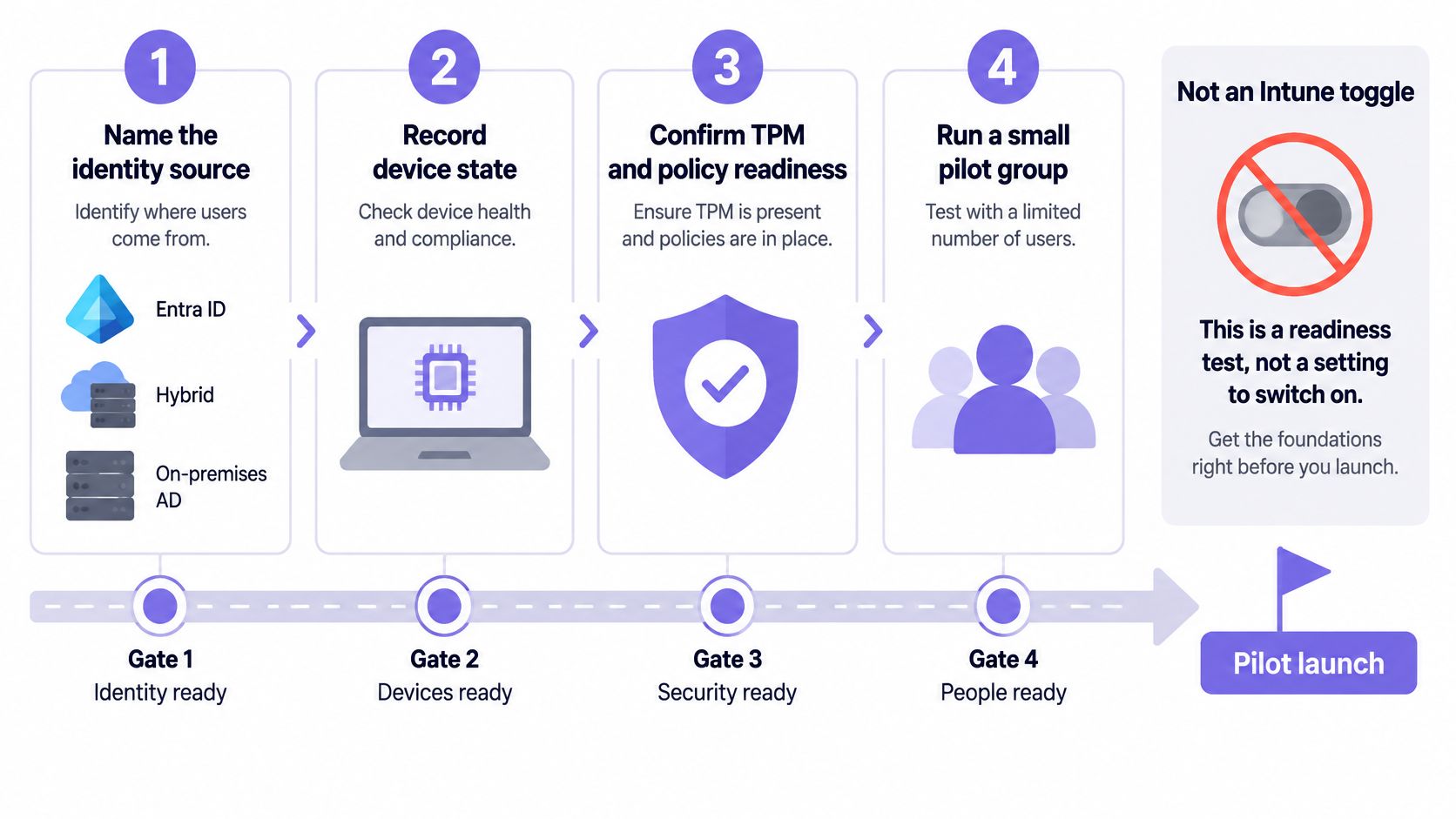
Hybrid cloud Kerberos trust being the simplest hybrid model does not erase recovery design. A FIDO2 security key is the better companion when the NCSC cases apply: shared workstations, unreliable connectivity, or a user who needs a credential that roams between PCs. Hello stays on the assigned laptop. The key covers the desk that is not theirs.
The same directory that issues that device trust is what you later point at WiFi. If certificate profiles are how you want the network to know the device, the pattern in certificate-based WiFi via MDM belongs in the readiness notes, not in week three of a failed pilot.
Do not schedule enrolment week until every gate has an owner. A blank owner is a fail.
Facial recognition is the demo. The PIN is the control that attackers will push. The National Cyber Security Centre's biometric guidance is direct. Organisations must secure the fallback PIN or password, because an attacker may try to force authentication onto the weaker alternative. It also asks you to assess biometric security, privacy, performance, device vulnerabilities, user guidance, and mobile-device-management controls. Biometrics are not automatically safe.
Passwordless does not mean fallback-free. The local PIN remains security-critical. A weak PIN policy can undermine the assurance of the hardware-backed key Windows Hello for Business is there to protect. The gesture is not the credential, and it is not a password that gets sent anywhere.
Fallback strength. Set a PIN length and complexity that would embarrass a shared-password estate. Do not park a four-digit PIN beside a TPM key and call the result phishing-resistant. The PIN is the path an attacker chooses once the camera is covered or the reader is "broken".
Camera or reader failure. The PIN is the supported sign-in method. Help-desk scripts should repair the sensor. They should not reset the key on the first call, because a reset throws away the credential you just provisioned and teaches users that Hello is fragile.
Users who cannot or do not want biometrics. Offer PIN-only Hello. Where the credential must move between PCs, issue a FIDO2 key. An opt-out of the camera is not an opt-out of the strong key.
Lost or shared devices. Hello belongs on assigned PCs, and there is a documented ceiling on how many people one device should hold. Wards, tills, and hot desks need a portable credential and a fast account disable. Adding another Hello profile to a front-desk PC is how you build a machine nobody can wipe cleanly.
Privileged administrators. Keep their sign-in policy separate from frontline staff. A convenience PIN that is fine for a caseworker is the wrong admin path. If an admin must reach a server remotely, give them a method you would accept in an incident review.
Accessibility and UK privacy. Tell people what stays on the device. Log exceptions when someone cannot use a sensor. Do not drop them back to a domain password and forget the row in the register.
A weak PIN is not a friendly fallback. It is the path you left open beside the key.
Frontline staff, admins, and shared PCs do not share one policy. Write three, and make the shared-PC policy say "security key" in the first line.
UK public-sector rollouts already showed what a measured ring looks like, years before passwordless became a slide title.
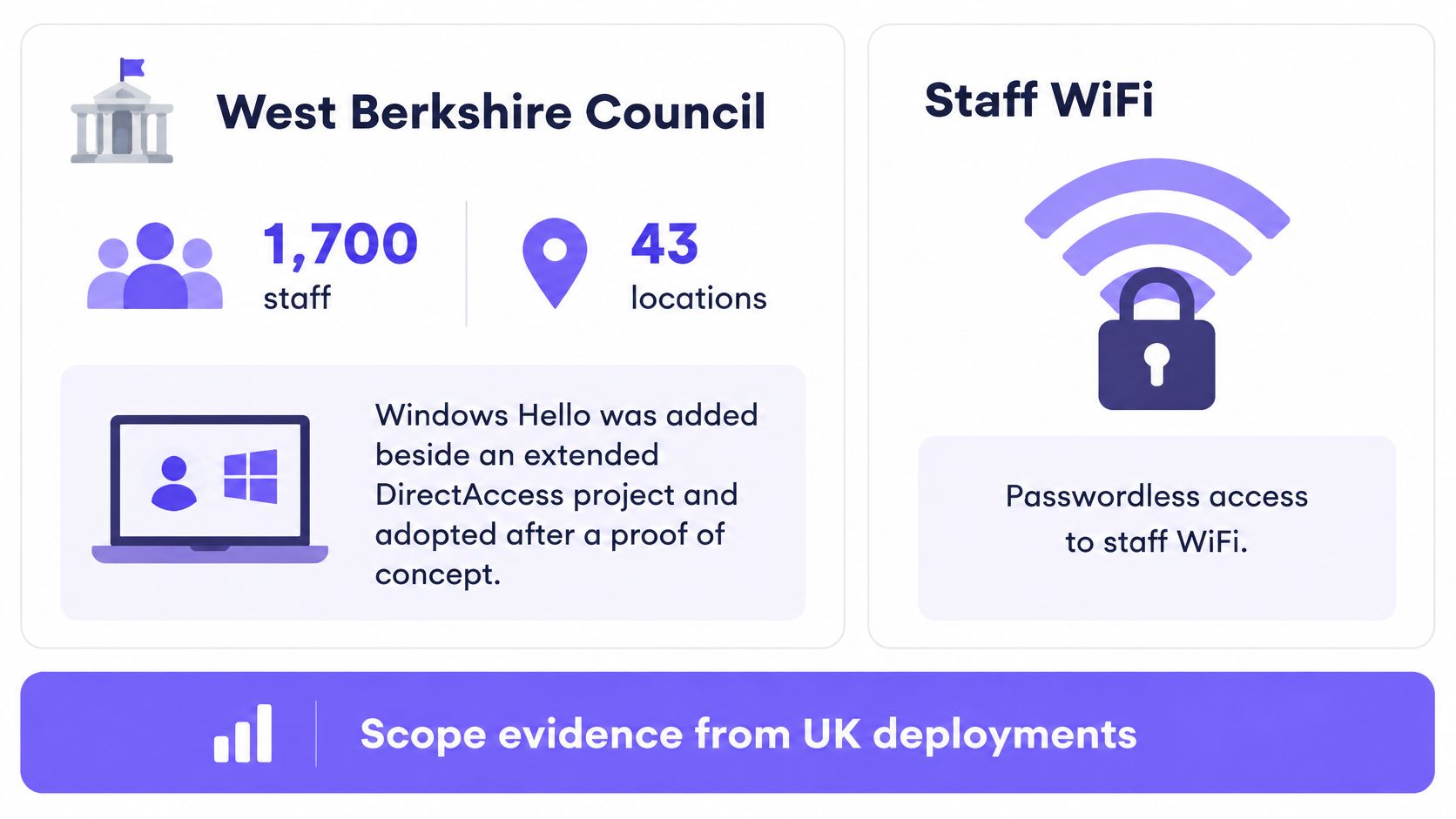
West Berkshire Council's NCSC case study covers a council responsible for approximately 1,700 staff working across 43 locations. The council introduced Windows Hello alongside an extension of its Microsoft DirectAccess project, after a proof of concept. A small group of social-care practitioners tested fingerprint and facial-recognition authentication on portable devices. The council reported that logins and device start-ups were estimated to be between 50% and 65% quicker. Hardware options were reviewed, configurations were checked against security guidance, and the council used NCSC support through its Secure by Default Partnership Programme. The useful part for an MSP is the shape: a named population, many sites, and a time saving someone was willing to estimate, not a slogan about going passwordless.
The Judicial Appointments Commission pilot, documented by the NCSC in June 2017, took a narrower cut. Windows 10 devices, including Surface Pro 4 and Lenovo models with fingerprint hardware, ran BitLocker and Windows Hello to NCSC guidance. Users entered a BitLocker PIN and then a fingerprint, and application access followed. It was a proof of concept, with an intention to test single sign-on for a Drupal business application. Device login was a step in a programme, not the programme.
Size ring one by role and by site. Social-care staff on portable devices are a different ring from office desktops. Standardise hardware only after you have measured time-to-desktop on the kit you already own. A faster login on one Lenovo does not justify a fleet refresh you have not timed.
Once that directory is the source of truth for joiners and leavers, staff WiFi can follow the same events instead of a passphrase taped under a router. On Staff WiFi, sign-in can use WPA3-Enterprise with provisioning and revocation tied to the customer's identity provider, with no shared passwords. That pattern fits hospitality, healthcare, and multi-tenant buildings, which is where staff WiFi has to survive shift changes. Guest onboarding stays a separate journey. Radio design stays out of this guide. The identity decision is the one you have already made on the laptop.
Pick one hybrid customer tenant and a pilot ring of individually assigned TPM PCs. Do not flip a tenant-wide switch and discover the shared ward PC on Thursday.
Purple Partners is how resellers, MSPs, and systems integrators sell identity-based WiFi once that directory is trustworthy. The pilot below is the identity work that has to land first. Partners get reseller training, an enablement portal with guides, and a dedicated support team when the network follows. Purple's markets include hospitality, retail, healthcare, education, residential and MDU, enterprise, transport, sports and entertainment, and the public sector, so the same ring shape shows up in a council, a clinic, and a hotel back office.
Size the MSP effort as help-desk hours in the first fortnight of each tenant, not as a licence true-up. A council-scale, multi-site estate is a later ceiling. It is not week-one scope. Ring two should be one business unit that uses an on-premises share, so Kerberos failures show up while the cohort is still small enough to call.
The failure MSPs see first is provisioning that never finishes. The user stares at a spinner, the device never registers a key, and someone suggests a reimage. Do not reimage. Check the MFA method.
| Symptom | Likely cause | Fix |
|---|---|---|
| Provisioning never completes | Pilot user has no working MFA method | Register MFA, then restart enrolment for that user |
| PIN works but on-premises share asks for a password | Cloud Kerberos or domain controller not ready, or wrong join state | Verify the Kerberos server object, DC readiness and hybrid or Entra join |
| Remote desktop still demands a password | That RDP path is outside Hello support | Offer a FIDO2 security key or another supported remote credential |
| Shared PC fills with profiles | More enrolled users than the device is built to hold | Stop Hello enrolment and issue portable security keys |
| Face or fingerprint fails and the PIN is trivial | Fallback weaker than the key | Repair the sensor and enforce a strong PIN policy |
Each fix is one action. A missing MFA method gets registered, then that user retries. A share that still wants a password is a Kerberos or join problem, not a camera problem. An RDP path that demands a password does not get a promise that Hello covers every remote desktop. A shared PC that is collecting profiles stops taking new Hello enrolments. A trivial PIN gets a stronger policy after the sensor is repaired, not a disabled feature.
These are operating controls, not a second readiness test.
Plan help-desk time for the first fortnight of each tenant. A one-click rollout across every customer is how you staff an incident. The control that matters most is the exception register: every user still on a password, an owner, and an end date.
Record three decisions this week. The trust model you already circled. The named pilot cohort. The end date on that password exception register. If any of the three is blank, you are not ready to widen the ring.
Purple Partners helps MSPs and integrators turn that directory into staff access that provisions and revokes with the identity provider, without a shared WiFi passphrase. If your pilot ring is the source of truth for joiners and leavers, the same events can drive who is allowed on the network. Visit Purple to see the partner programme, training, and support behind that work.
Join 80,000+ venues already running on Purple. No targets, no minimums, just bigger deals.