Captive portal login explained for partners
Captive portal login, explained for partners: authentication flow, security and privacy limits, failure fixes, and when to drop the splash page.
Access point security explained for UK MSPs and venues: threat models, WPA3 and 802.1X, segmentation, guest access and monitoring. A 2026 guide.
The café's WiFi password is printed on the wall, the card terminal works, and nobody has complained about connectivity. Then the owner discovers that a former barista still connects from their flat above the shop. The password hasn't been cracked. The network is doing exactly what it was configured to do.
That's the access point security problem MSPs and venue operators need to solve: not just protecting the wireless connection, but deciding who should still have access and what they should be able to reach.
An access point is like a door opening onto the pavement. Radio range makes that door visible beyond your premises, including to people who never enter the building. A locked front entrance doesn't stop someone attempting a wireless connection from outside.
Access point security is the combination of controls governing who can join, how traffic is protected over the air, and which resources connected devices can reach. Those are separate decisions, even when the controller presents them on adjacent configuration screens.

Keep these terms distinct when designing or reviewing a deployment:
A network can pass an encryption check and still fail its access-control test. The former barista might establish a properly encrypted connection while retaining permissions they should no longer have.
Practical rule: A successful connection proves that the configured admission rules worked. It doesn't prove those rules were appropriate.
In a small café, a single SSID might serve customers, staff laptops and operational equipment. The immediate design question is whether a customer's device can communicate with equipment used to run the business.
A hotel has a different problem. Staff handhelds, guest phones and smart-room equipment may share physical radios, but they shouldn't inherit identical permissions. Separate logical networks let the operator reuse the wireless infrastructure without treating every connected device as equally trusted.
The useful output is a map connecting identity, connection method and permitted destinations. With that map, an MSP can identify credible threats, select a suitable wireless standard, choose an authentication model and test whether the intended restrictions work.
An attacker's path can be straightforward:
Don't assume the building boundary is the wireless boundary. Survey the pavement, neighbouring premises and car park as well as occupied rooms.
Access point threats and the primary control for each
| Threat | How it works | Primary control |
|---|---|---|
| Rogue access point | Unauthorised AP plugged into the LAN or placed nearby | Wireless intrusion detection and regular rogue scans |
| Evil twin | Clone of a real SSID lures devices into connecting | Certificate validation on managed clients and alerting for duplicate SSIDs |
| Eavesdropping | Captures traffic on open or weakly protected networks | WPA3 or WPA2-Enterprise, plus HTTPS everywhere |
| Key reinstallation (KRACK-class) | Exploits handshake behaviour to reinstall keys in vulnerable WPA2 implementations | Firmware and client patching, with WPA3 migration where supported |
| Shared password misuse | Former staff or visitors retain access after leaving | Per-user credentials with directory-driven revocation |
| Management interface exposure | Attacker gains administrative control of the AP | Restricted management segment, MFA and disabled direct remote administration |
| Lateral movement from guest network | Guest or IoT device reaches internal systems | Client isolation and firewall rules between VLANs |
An opportunistic attacker looks for an easy connection, an exposed management page or a familiar password. A targeted attacker may copy the venue's SSID and place a convincing evil twin where staff devices are likely to encounter it.
Matching the network name isn't enough to establish trust. Managed enterprise clients should validate the authentication server's certificate against an explicitly configured trust policy. Teaching users to accept certificate warnings defeats that protection.
A trusted insider starts somewhere else entirely. They may already have valid access, or they may plug a consumer router into an available switch port to improve coverage. Their intent doesn't change the need to identify and control that device.
A nearby unknown radio isn't automatically connected to your LAN. Compare its BSSID, the radio's identifier, with the authorised inventory, then investigate its physical location and any wired attachment.
An unauthorised AP on a switch port can bypass the intended admission controls. A neighbouring business's AP may be visible through the wall. Don't use active wireless containment indiscriminately against equipment you don't control.
KRACK-class attacks are a different category again: they exploit vulnerable protocol implementations rather than someone knowing a password. Treat patch status as part of the threat model, not as a separate housekeeping task.
For business impact, prioritise what the attacker can reach after connecting. A compromised room sensor that can contact an internal server creates a more consequential path than an isolated device with internet-only access.
Draw the threat model per site. Record who can get within range, which sockets are accessible, which identities can connect and which destinations each network permits.
The protocol choice sets the ceiling on everything else you configure. A controller setting labelled secure doesn't remove the need to patch clients, review compatibility or retire unsupported equipment.
WiFi security standards and when to use them
| Standard | Encryption | Deployment verdict | Suitable use |
|---|---|---|---|
| WEP | RC4 | Broken and obsolete | Never deploy |
| WPA with TKIP | TKIP | Deprecated, with practical attacks published | Never deploy |
| WPA2-Personal | AES-CCMP with shared passphrase | Interim option with a long, unique passphrase | Small private sites |
| WPA2-Enterprise (802.1X) | AES-CCMP with individual authentication | Maintain patches and plan migration | Managed networks where WPA3 is unsupported |
| WPA3-Personal | SAE authentication with AES-CCMP | Preferred personal-network option where supported | Small sites with compatible clients |
| WPA3-Enterprise | AES-CCMP, or AES-GCMP in its higher-security mode | Preferred managed-network option where supported | Staff access |
Published attacks against TKIP, including the Beck-Tews and Ohigashi-Morii work, demonstrated practical weaknesses in WPA's original cipher, and WEP and original WPA carry known flaws of the same order. These aren't modes to keep alive on the staff SSID for the convenience of one obsolete printer. Where a legacy device genuinely cannot move, put it on a restricted exception path with its own SSID, tight segmentation and a documented removal date, rather than weakening the main network to accommodate it.
The KRACK attacks showed that key reinstallation flaws could expose encrypted WPA2 traffic and, in some cases, allow traffic injection. The disclosure also drew the distinctions that mattered for operators: patched WPA2 remained far stronger than WEP or WPA, and a private WPA2 network was safer than open public WiFi.
The operational lesson is to patch both ends of the link. Updating the AP says nothing about whether every laptop, handheld or embedded client received the relevant fix.
KRACK was a protocol failure rather than a password failure. Correctly configured encryption can still carry an implementation weakness, and the cipher never decided who belonged on the network in the first place.
For a small private network, WPA2-Personal with a long, unique passphrase remains a workable interim choice. For managed staff access, favour WPA2-Enterprise or WPA3-Enterprise, with WPA3 preferred where the client estate supports it.
WPA2/WPA3 transition mode eases migration, but it keeps an older connection path open. Some clients negotiate the weaker option when both are offered, so test what each device type selects rather than assuming the stronger one wins.
Use the comparison of WiFi security types when documenting the selected standard. Record the required client capabilities and the retirement condition for any temporary compatibility mode.
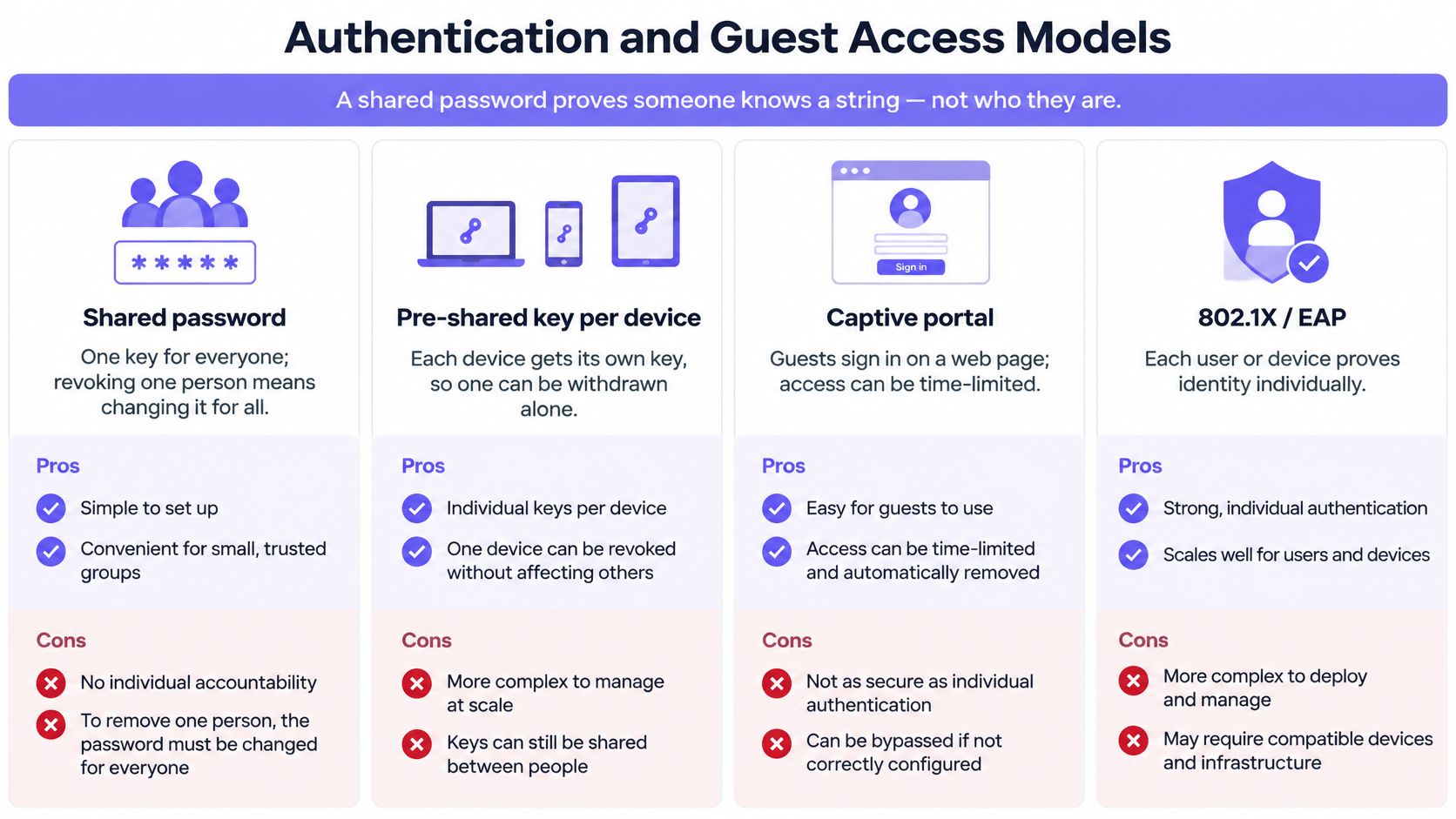
A shared password proves that someone knows a string. It doesn't identify the person holding it, and you can't withdraw it from one leaver without changing it for everyone else.
Encryption protects the traffic, not the admission decision. A correctly encrypted SSID can still admit the wrong person or device, which is why authentication choice matters more than the headline protocol.
Certificate-based access changes the operating model. With 802.1X under WPA2- or WPA3-Enterprise, each managed device presents an individual credential, and access is granted and revoked per device through the authentication service rather than through a shared key.
Authentication methods compared
| Method | Identity proven | Revocation | Best use |
|---|---|---|---|
| Pre-shared key | Knowledge of a shared passphrase | Change the key for everyone | Small private sites |
| 802.1X with EAP-TLS | An individual device certificate and its private key | Per device, through certificate revocation and authorisation policy | Managed staff networks |
| Captive portal | Click-through acceptance or a registered account | Session expiry or account withdrawal | Guest access |
| MAC filtering | A presented MAC address only, which can be spoofed | Remove the entry | Inventory assistance, not reliable authentication |
With EAP-TLS, the client and the authentication service authenticate each other using certificates. Configure managed clients to validate the expected server identity, and protect each device's private key. Installing the certificate is only half the control.
The harder part is the lifecycle. Enrolment, renewal and revocation all need to run reliably, and directory status should feed directly into network authorisation. When an account is disabled, test the effect on both new connection attempts and sessions that are already up.
A leaver's revoked certificate will fail at the next authentication, but don't assume a disabled account drops a live session. Document who revokes access, how that change reaches the authentication service, and how active sessions are terminated.
Guests won't compensate for weak venue controls. A 2021 study of 16,000 UK households described by Purple found that 60% of people regularly used public WiFi, and within that group 28% connected to unprotected networks despite feeling insecure or exposed.
Build guest access on a dedicated segment with client isolation and an explicit session policy. Then choose an onboarding method that fits the venue:
A captive portal controls the onboarding journey; it doesn't, by itself, encrypt the wireless link. Assess the underlying SSID security separately.
Registration also brings personal-data handling responsibilities. Collect information for a defined purpose, provide an appropriate privacy notice, and avoid gathering identity details merely because the portal allows it.
In student accommodation, hotels and build-to-rent properties, residents expect their own devices to find each other privately. Give each unit an isolated network with resident-specific credentials instead of a building-wide shared key. That design supports televisions, speakers and other browserless devices without exposing them to every neighbour, and on departure you withdraw one resident's access rather than forcing a building-wide password change. Purple's multi-tenant WiFi applies this model directly, giving each tenant a private network managed through a network pass in the Purple app.
Legacy printers, sensors and handhelds need an explicit exception path. Inventory their capabilities, place them in a restricted segment, and give every exception an owner, permitted destinations and a review date.
An exception should describe the access a device needs, not excuse unrestricted access because it can't support enterprise authentication.
A strong protocol on a flat network is still a weak build. Configure the admission policy, management path and traffic boundaries together, then test them from a client rather than relying on the controller's summary screen.
The UK government's wireless-network security standard combines modern wireless security, central management, network isolation, patching and physical protection. It also warns against connecting APs directly to private networks in a way that creates an unprotected route into internal systems.
For equipment selection, the government baseline includes enterprise-grade 5 GHz and 802.11ac-or-faster support. Treat those capabilities as part of procurement review, alongside firmware support and authentication features.
A network access controller can help connect identity decisions to network policy. It still needs correctly configured switches, authentication services and enforcement points.
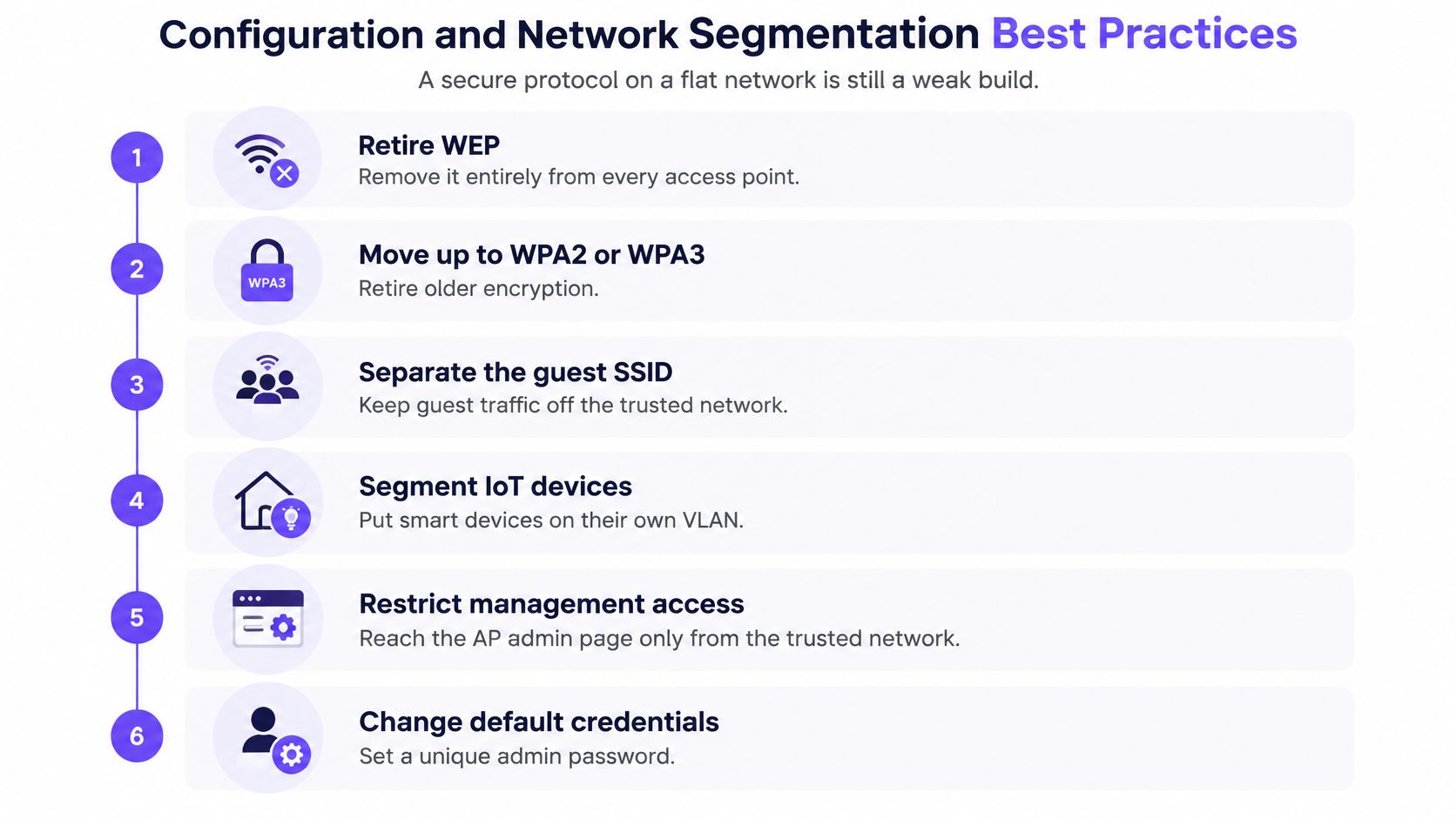
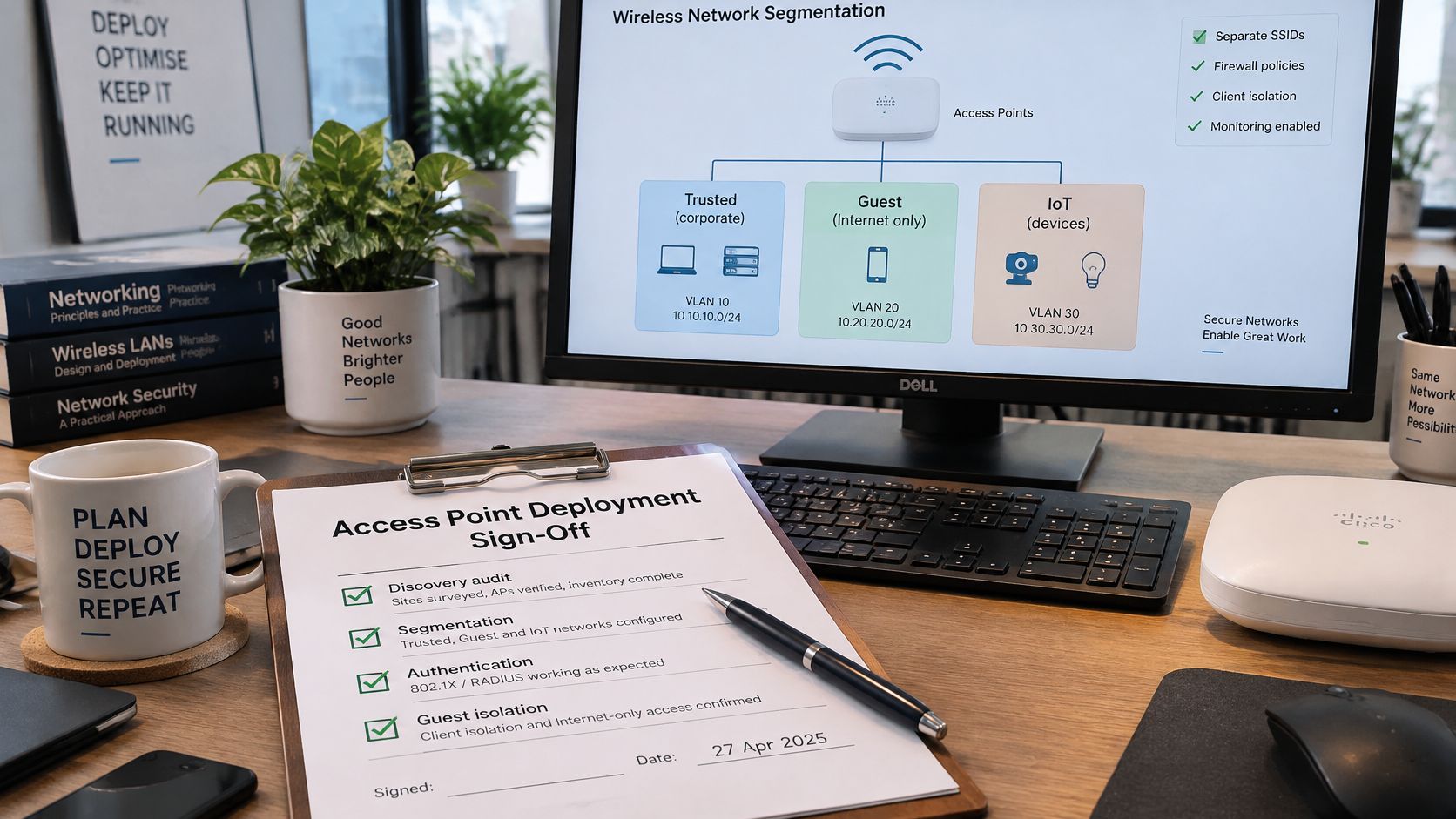
Create distinct staff, guest and IoT VLANs, with firewall policy governing communication between them. Different SSID names don't provide isolation if they terminate in the same unrestricted network.
Block guest access to internal destinations by default. Enable guest client isolation too, but recognise its limits: preventing direct wireless peer communication doesn't replace routed firewall controls.
For IoT, allow the services the devices need rather than granting general internal access. If a printer requires staff access, create that specific path without making its entire segment reachable.
Mount APs where unauthorised people can't reach the device, reset button or Ethernet connection. Secure accessible patch panels and cabinets, and enable tamper alerts where the equipment supports them.
Check switch uplinks, VLAN tagging and PoE capacity under realistic load. Document which services fail when an access switch or power source becomes unavailable, rather than assuming radio overlap provides resilience.
Set a firmware policy based on vulnerability severity, vendor advice and operational risk. Keep an emergency route for actively exploited flaws, a routine maintenance window, a tested rollback procedure and named approval for deferred updates.
Save configuration backups before changes. Afterward, verify authentication and permitted traffic from representative clients, including an exception device.
Start with signals that an engineer can investigate, not a dashboard full of unassigned warnings. A secure deployment needs someone responsible for recognising changes and deciding whether they indicate a fault, misuse or compromise.
Monitoring signals and what they usually mean
| Signal | Likely cause | First check |
|---|---|---|
| Spike in failed 802.1X authentications | Expired or revoked certificate, or misconfigured client | RADIUS logs and certificate status for the affected device group |
| Unknown BSSID broadcasting your SSID | Rogue or evil twin access point | RF survey, followed by wired port tracing if locally attached |
| Guest VLAN traffic reaching internal subnets | Firewall rule gap or routing misconfiguration | Firewall rules and recent change log |
| AP firmware older than policy allows | Missed update window | Asset inventory and scheduled update review |
| Overnight client counts with no staff present | Unauthorised client, expected unattended equipment or credential misuse | Per-device session history and account status |
| Management login from an unexpected address | Exposed or reused administrative access | Admin audit log and MFA enrolment check |
A cluster of failed authentications after certificate renewal probably warrants a different response from failures spread across unrelated identities. Compare the affected device group, policy changes and authentication failure reasons before disabling a production SSID.
Likewise, an overnight connection may belong to a legitimate sensor. Keep expected device behaviour in the inventory so the on-call engineer can distinguish routine operation from unexplained access.
Governance needs monitoring too. The UK Government's Cyber Security Breaches Survey 2025/2026 reports that the proportion of large businesses maintaining separate staff and visitor WiFi fell from 93% to 85% year on year. That finding doesn't establish the cause of an incident, but it reinforces the need to verify that intended separation remains in place.
Export authentication records and rogue-scan results monthly into the operational evidence store. Give each export a named reviewer, protect access to personal information and retain it according to the organisation's documented policy.
An encryption setting is a configuration claim. An audit needs evidence that the organisation's controls operate as intended, including which users can reach protected systems and how unwanted access is removed.
Prepare evidence against the assessment the customer faces. Don't present a wireless product, certificate or screenshot as proof of compliance with every applicable framework.
For PCI DSS, identify wireless paths that can reach the cardholder-data environment and validate the segmentation relied on for scope decisions. A guest label isn't evidence that payment systems are isolated.
For UK GDPR, consider the personal information collected during onboarding and retained in session logs. Document purpose, access restrictions and retention alongside the technical controls protecting those records.
For Cyber Essentials, align the evidence with the applicable assessment requirements, particularly secure configuration, access control and security updates. Wireless enterprise authentication can support the wider control environment without being a substitute for the assessment criteria.
Audit test: Could another engineer reproduce the access decision from the records, rather than accepting the configuration owner's explanation?
Store the pack centrally with appropriate access control, version history and an accountable owner. Agree a retrieval target that the operations team can meet, then rehearse producing the evidence before an assessment.
Screenshots can help explain a setting, but pair them with dated exports and test results. The useful evidence shows effective authorisation, including failed attempts to reach resources a client shouldn't access.
Sign-off should depend on witnessed test results, not a completed installation ticket. Run the checks using representative managed devices, guest devices and awkward legacy clients.
Complete discovery. List every authorised SSID, AP, switch attachment and client class. Classify each as staff, guest, IoT or an approved exception, and resolve unexplained equipment before handover.
Record the baseline. Put the security standard, authentication method, role assignments, segment map and firmware policy in the handover pack. Include configuration ownership and recovery access so the customer isn't dependent on an installer's personal account.
Run the rogue scan. Compare observed radios with the authorised inventory and classify unknown devices. Record legitimate neighbours instead of repeatedly escalating the same harmless BSSIDs.
Test guest reachability. From a guest client, attempt access to designated internal test resources and infrastructure management interfaces. Confirm required internet services still work, and retain the firewall evidence for denied paths.
Exercise the leaver process. Disable a test identity and check both an existing session and a fresh connection. Record the actual enforcement behaviour against the agreed window, including any session-disconnect action.
Review every exception. Confirm each non-enterprise device has an owner, restricted segment, permitted destinations and review date. Reject exceptions whose only justification is that unrestricted access makes installation easier.
Check the installed hardware's capabilities before proposing a refresh. If it already supports the necessary authentication and segmentation features, the missing work may be identity integration and policy configuration rather than new APs.
At Purple, we deploy a hardware-agnostic, cloud-based overlay on existing WiFi infrastructure, with no additional hardware required in most cases. Our supported infrastructure includes Cisco, Cisco Meraki, HPE Aruba Networking, Ruckus Networks, Extreme Networks, Juniper Mist and Ubiquiti; our Staff WiFi uses WPA3-Enterprise with automatic device provisioning and revocation tied to the customer's identity provider through the Purple app, without shared passwords.
Confirm model, firmware and feature compatibility against current partner documentation during design. An overlay doesn't replace segmentation, patching, physical protection or monitoring, so assess it against the same acceptance tests as the underlying network.
Purple helps partners add identity-based access to existing WiFi infrastructure, including staff access provisioned and revoked through the customer's identity provider. Visit Purple to discuss your installed hardware, identity integration and the acceptance tests needed for a controlled deployment.
Join 80,000+ venues already running on Purple. No targets, no minimums, just bigger deals.