Internet of things and internet of everything explained
Internet of Things and Internet of Everything explained: how they differ in scope, data flows, security and business value, with UK use cases.
Difference between IPv4 and IPv6 explained for UK MSPs and WiFi partners: addressing, NAT, security, routing and a safe migration path.
Most advice on the difference between IPv4 and IPv6 stops at the address length and tells you to switch the feature on. That advice fails the first time a guest splash page loops, a camera stream drops, or a log shows a source you cannot tie back to a person. IPv6 is not a drop-in replacement for IPv4. The two protocols do not talk to each other, devices pick a path on their own, and a network can look ready while half the path is still broken.
The useful question for an MSP or a WiFi partner is what changes on a mixed estate on a Tuesday afternoon. Staff laptops, guest phones, building controllers and a payment terminal rarely move together. DNS, firewall policy and application support decide whether traffic prefers one family or the other. Treat the change as an application and policy job, not an addressing upgrade, and the day-to-day work becomes clearer.
IPv6 succeeds IPv4 with a far larger address space, a simpler header and no need for NAT to stretch the pool, but the protocols are not compatible, so most sites run both.
| Feature | IPv4 | IPv6 |
|---|---|---|
| Address length | 32 bits | 128 bits |
| Address count | About 4.3 billion | About 3.4 × 10^38 |
| Notation | 192.0.2.1 (dotted decimal) | 2001:db8::1 (hexadecimal, colon-separated) |
| Header size | 20 bytes minimum, 12 core fields | 40 bytes fixed, 8 fields |
| Fragmentation | Routers and sending host | Sending host only |
| Header checksum | Present | Removed |
| Address assignment | Manual or DHCP | SLAAC, DHCPv6 or manual |
| NAT | Routine for most sites | Not needed for addressing; firewalls still filter |
A WiFi operator feels each row in a different place. Address length and count decide whether you ration leases or hand a whole subnet to one SSID. Notation is what your helpdesk will mis-type, so train them on compressed hex before you open the first VLAN. The fixed 40-byte header looks larger on paper, yet routers no longer recompute a checksum or fragment in the path, which is the gain that shows up under load. SLAAC lets a phone build an address from a router advertisement, which is why a missing advertisement looks like "no internet" even when the radio is fine. Dropping NAT removes a translation table, not the need to filter.
Practical rule: enabled on the router is not the same as usable from the handset to the service.
Run this check on any client before you argue about design. Confirm the device shows both an IPv4 address and an IPv6 address, then confirm each family has its own default gateway. One gateway missing means that family is decorative.
Size the plan in three units and write them down before you touch a VLAN. A /48 covers a whole site, large building or campus. A /56 fits a single tenant unit, student room or residence. A /64 is one VLAN, subnet or SSID, and it is the size SLAAC expects. Splitting a /64 further breaks autoconfiguration, so do not do it to "save space".
| Prefix | Typical use | Number of /64 subnets |
|---|---|---|
| /48 | Whole site, large building or campus | 65,536 |
| /56 | Single tenant unit, student room or residence | 256 |
| /60 | Small business or a few tenant zones | 16 |
| /64 | One VLAN, subnet or SSID | 1 |
IPv4 scarcity pushes you the other way. You share one public address behind NAT and hand out thin private ranges that collide the moment two tenants use the same printer subnet. IPv6 lets each site, tenant and VLAN hold its own block, which is how you keep guest, staff and building traffic separable when device counts keep climbing, a pressure already visible in how many devices are connected to the internet.
Say a 200-room hotel receives one /48. That block contains 65,536 /64 networks, so room VLANs, a staff SSID and a back-of-house LAN can each take one /64 without borrowing. If the brief is tighter, reserve a /56 for each of 100 guest or staff zones. A /56 still holds 256 /64s, which is enough for a residence floor plus a management subnet you can revoke without renumbering the building.
Delegation is a three-step handoff. The provider assigns the prefix. The router takes a sub-prefix for each VLAN. You record which tenant holds which block.
Record prefix ownership in the same IP address management record as IPv4, so guest traffic can still be traced when a log shows only an IPv6 source.
If that record lives in a spreadsheet nobody updates after a room move, the plan has already failed.
NAT44 is why an IPv4 site hides many devices behind one public address. The gateway rewrites the source address and the source port, then keeps a state table so the reply finds its way back. That table is also why a security log often names the firewall, not the phone. Attribution becomes a join across DHCP leases, NAT translations and a portal session, and any one of those clocks drifting breaks the join.
IPv6 normally routes end to end. A client can hold a globally routable address, so the packet leaves with the address you will later see in the log. That is the operational win. It is also the trap.
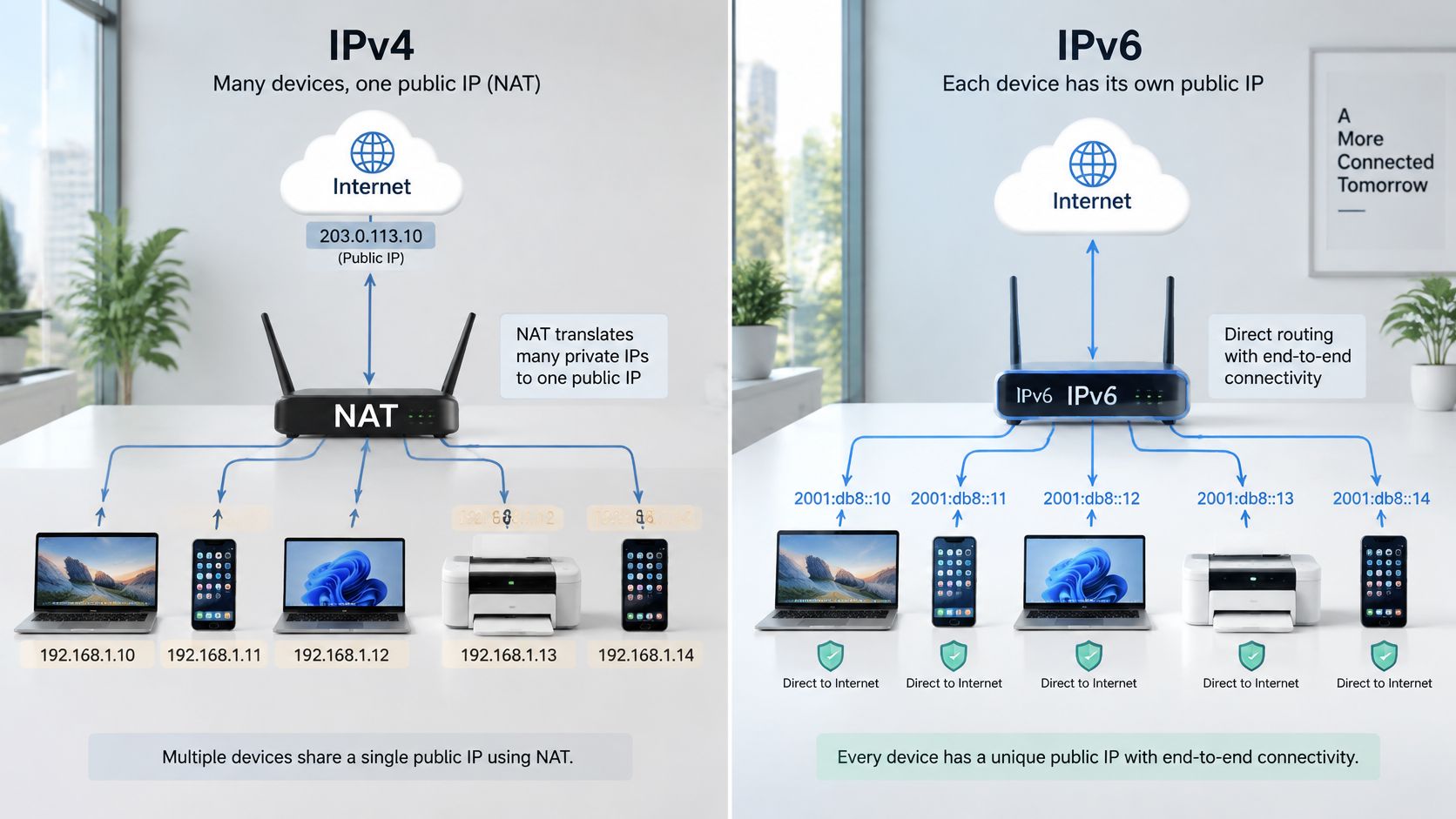
Removing NAT does not remove the need for control. A stateful firewall still needs an explicit policy, and an address is reachable from the internet unless you filter it. People who treat "no NAT" as "already safe" leave every client exposed the moment the upstream route appears.
Routing stays hierarchical, but aggregation is the part large operators feel. A tidy prefix collapses into one route instead of a pile of small IPv4 fragments, which keeps the table smaller and failover cleaner. The new failure mode sits on the LAN. A misconfigured access point can send a rogue router advertisement and become the gateway for every IPv6 client on that SSID. Router advertisement guard and DHCPv6 snooping are the controls, and they have no tidy IPv4 twin, because IPv4 clients were waiting on a DHCP offer you could already snoop.
Guest isolation has to cover both families. Picture a hotel SSID where the firewall drops traffic from the guest range toward reception, the property system and the cameras, and the portal allows only web ports outbound. The same policy object has no IPv6 entries. A guest laptop prefers IPv6, walks straight past the IPv4 deny, and reaches a staff host that was "isolated" on the drawing. The ticket says the isolation works, because the tester used an old laptop with IPv6 turned off.
The same gap shows up in content controls. If you only police one family, the other becomes the bypass, which is why securing WiFi has to be designed per protocol, not copied from an IPv4 template and assumed.
One rule is worth keeping on the change ticket. Every permit and every deny exists twice, once per family, or it does not exist.
The failure you will hear first is a slow page, not a hard error. Clients race the two families and keep whichever answers first, so a broken IPv6 path usually adds delay rather than a clear timeout. That behaviour is Happy Eyeballs (RFC 8305). It hides faults until someone compares the two paths on purpose.
| Device or service | Typical symptom | Likely cause | Check to run |
|---|---|---|---|
| Captive portal and guest splash page | Login page skipped or looping | Redirect rules match IPv4 only | Test from an IPv6-preferring client |
| Content filter | Blocked sites load | AAAA records bypass IPv4 rules | Compare A and AAAA responses |
| Building management controllers | Intermittent alarms | Fixed IPv4 gateway, no IPv6 stack | Confirm IPv6 support in firmware |
| IP cameras with cloud callbacks | Dropped streams | Vendor service reachable over IPv4 only | Check the outbound IPv4 path |
| Printers and legacy scanners | Scan to folder fails | Hard-coded IPv4 addresses | Check name resolution and stored address |
| Footfall and analytics tags | Visitor counts drop | Attribution keyed to IPv4 client address | Compare counts per address family |
| Stateful firewalls | Unexpected open paths | No IPv6 rules configured | Audit rule sets per protocol |
A captive portal that only rewrites IPv4 HTTP never sees the IPv6 session, so the splash is skipped or the client loops between "connected" and a blank page. A filter that never inspects AAAA answers lets the blocked site load on the other family. Building controllers and a lot of IoT and wider connected-device estates still ship with a fixed IPv4 gateway and no second stack, so they alarm only when that gateway answers. Cloud cameras drop the stream when the vendor callback is IPv4-only, even though the local SSID looks healthy. Printers and scanners fail "scan to folder" because the stored address never changes when DNS does. Analytics keyed only to the IPv4 client under-count the moment phones prefer the other family.
On Windows, run ipconfig /all and confirm an IPv6 address, a default gateway for each family and the DNS servers in use. On macOS or Linux, use ifconfig or ip addr, then ip -6 route, and look for the same pair of gateways. Capture ICMPv6 type 134 router advertisements and confirm the advertised prefix is a /64 when SLAAC is in use. Where DHCPv6 is the design, confirm the server hands out addresses and DNS options, and read the prefix-delegation lease on the upstream router.
Resolve a key name with nslookup -type=AAAA and compare it with the A answer. Then test with ping -6 and curl -6 against a known IPv6 host, and repeat from an IPv4-only client so you know which family failed. When the complaint is "slow", time each family on its own. Log the result against the device record. A fault you cannot name by protocol will be blamed on the radio.
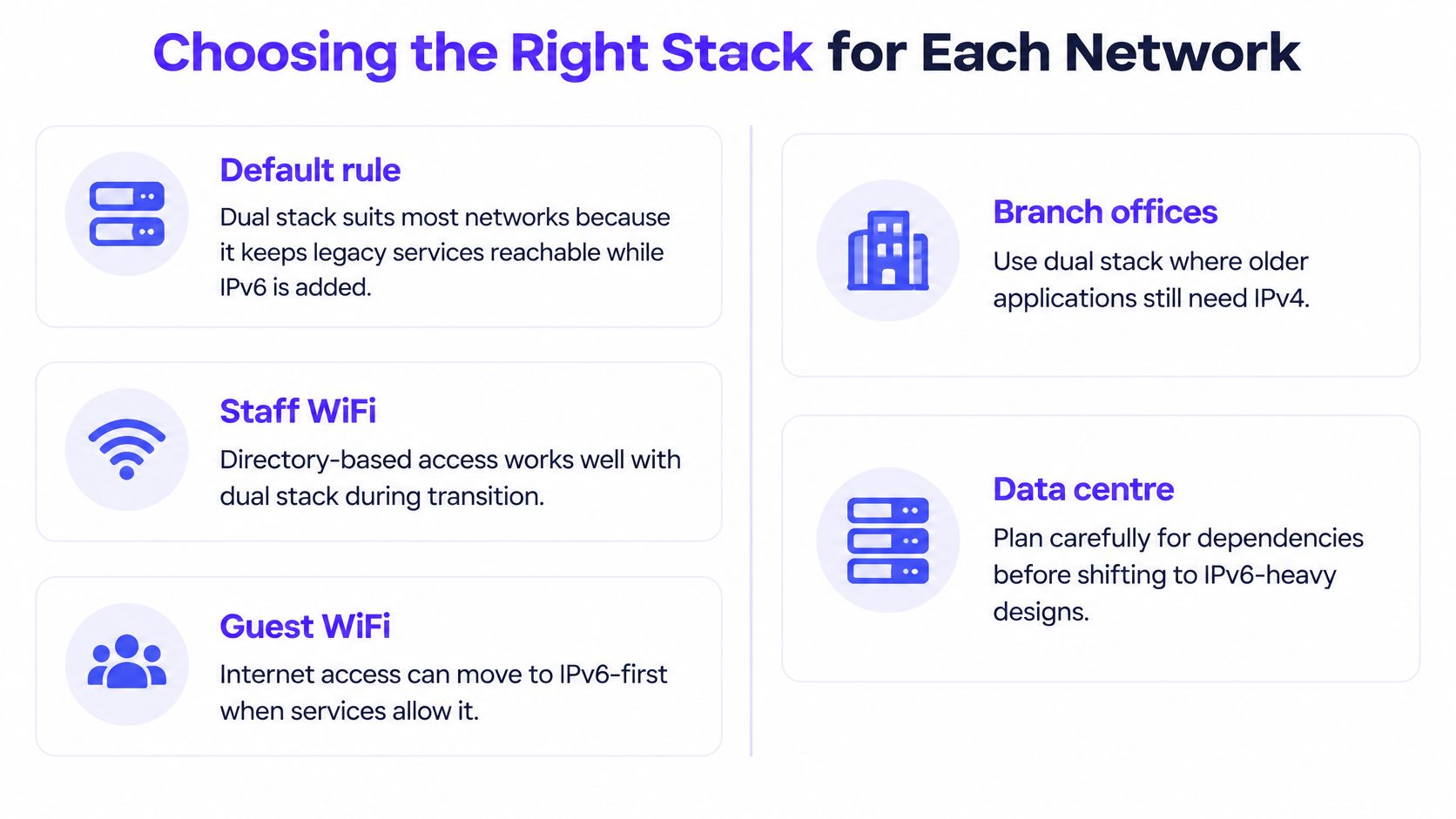
Dual stack suits most networks, because it keeps legacy services reachable while IPv6 is added. IPv6-only, with NAT64 and DNS64, belongs in a lab or a network where every device and every vendor service has already passed a test. Everywhere else, pick the stack by what must not break.
| Network type | Recommended stack | Main condition |
|---|---|---|
| Staff WiFi | Dual stack, IPv6 rules mirrored | Identity logged per address family |
| Guest WiFi | Dual stack, IPv6 isolated | Captive portal tested on both families |
| Student housing or MDU | Dual stack, /56 per unit where prefix delegation works | Tenant isolation at VLAN level |
| Hotel PMS and payment terminals | IPv4 until audited | Vendor confirms IPv6 support |
| Building management and IoT | IPv4 or segmented dual stack | Firmware supports IPv6 and no legacy gateways |
| Public WiFi with content filtering | Dual stack, filtering on both families | Filtering verified for AAAA answers |
Staff WiFi with directory sign-in should carry both families, with the IPv6 policy mirrored from the IPv4 one and the directory session stored against each address. Lose the per-family log and you cannot answer who used a shared laptop.
Guest WiFi should stay dual stack, with IPv6 kept off internal networks, and the splash proven on a current phone as well as an old laptop. A portal that only passes the old laptop test is not finished.
Student housing and other multi-dwelling buildings should take a /56 per unit where the router can delegate, and isolation should sit on the VLAN, not on a shared ACL someone will edit during an outage. If delegation is unreliable on that firmware, do not fake it with a flat /64 for the whole block.
Hotels should leave the property system and the payment terminals on IPv4 until the vendor states support in writing. A card machine that fails on a Saturday night is not a pilot.
Building management and IoT stay on IPv4, or on a segmented dual stack, until firmware notes confirm a stack and you have removed any hard-coded gateway. Public WiFi that filters content has to filter both families, and someone has to load a blocked name and watch the AAAA path fail closed.
If you cannot name the condition in the right-hand column, you do not have a design yet. You have a hope.
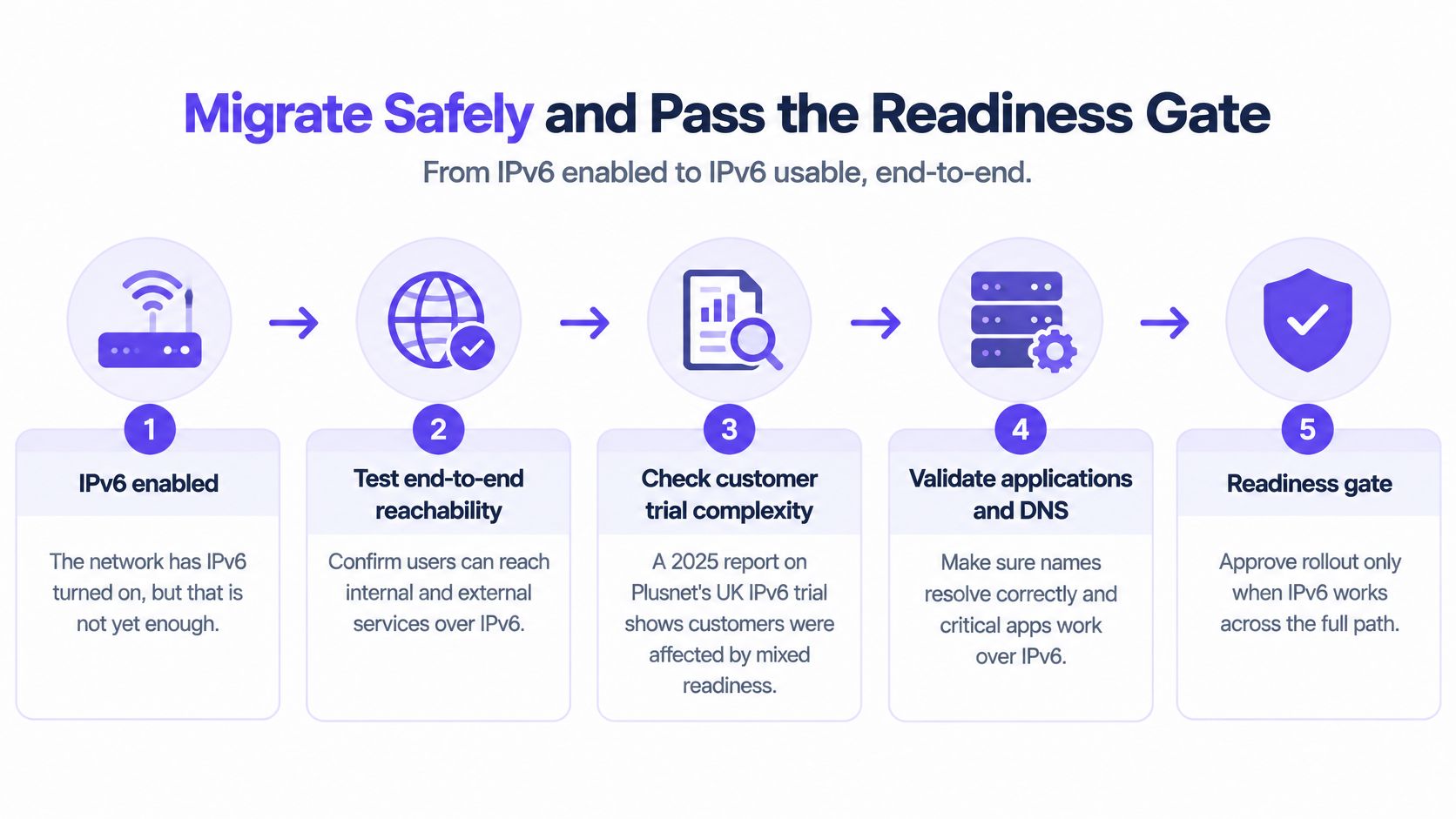
IPv6 enabled is not IPv6 usable end to end. Turning the protocol on means routers advertise a prefix. Usable means a real client reaches the services that client needs, on the family it prefers, with a log you can defend.
A 2025 report on Plusnet's UK IPv6 trial shows why that gap is normal rather than a mistake. Customers were expected to receive both a static IPv4 address and a /56 IPv6 prefix, while local devices kept using private IPv4 addresses alongside public IPv6 addresses. Guest, staff, IoT, legacy building-management and security devices then behave differently depending on DNS results, firewall policy, application support and whether traffic prefers IPv6. UK organisations generally need coexistence, dual stack or translation, because the protocols are not directly compatible. The same mixed picture shows up when you are planning a move between cloud environments: the network can be ready while the application still assumes the old address.
I would start the pilot on a guest VLAN rather than the payment VLAN. Guests complain quickly, and you can revert without taking card machines down.
Before any wider policy change, pass four checks.
If any check fails on a staff or guest network, keep the existing IPv4 policy and fix the gap first. We have run this kind of public layer in the open, including the landing platform, content filtering, security and real-time analytics for Newcastle City Council, and the filter only holds if both families are in scope.
Name the pilot site and put a review date on the ticket before you enable anything. A pilot without a date becomes the production network by accident.
Purple gives channel partners staff WiFi, guest WiFi and multi-tenant networking that stay identity-based across mixed IPv4 and IPv6 estates, so onboarding, filtering and analytics follow the person rather than a single address family. If you are designing that stack for venues you already support, visit Purple and see how the partner portal, white-label options and hardware-agnostic overlay fit the networks you run today.
Join 80,000+ venues already running on Purple. No targets, no minimums, just bigger deals.