Distance for WiFi: How Far Your Network Really Reaches
Distance for WiFi depends on band, walls and access point placement, not one radius. See UK range benchmarks, a link budget method and practical fixes.
A 2026 MSP guide to securing wi fi: control-plane risks, SSID and VLAN design, 802.1X, guest isolation and the checks that prove it.
Set a strong Wi-Fi password, turn on WPA2 or WPA3, and you're secure. That's the advice most clients repeat back to you, and it's incomplete enough to be dangerous on a managed estate. Securing Wi-Fi is not securing the air alone. If an attacker can rewrite the router, reuse a shared key that never expires, or cross from a guest SSID to payroll, your encrypted radio link has protected the wrong thing. I'd start every wireless review by separating encryption from identity, segmentation, and control of the management plane.
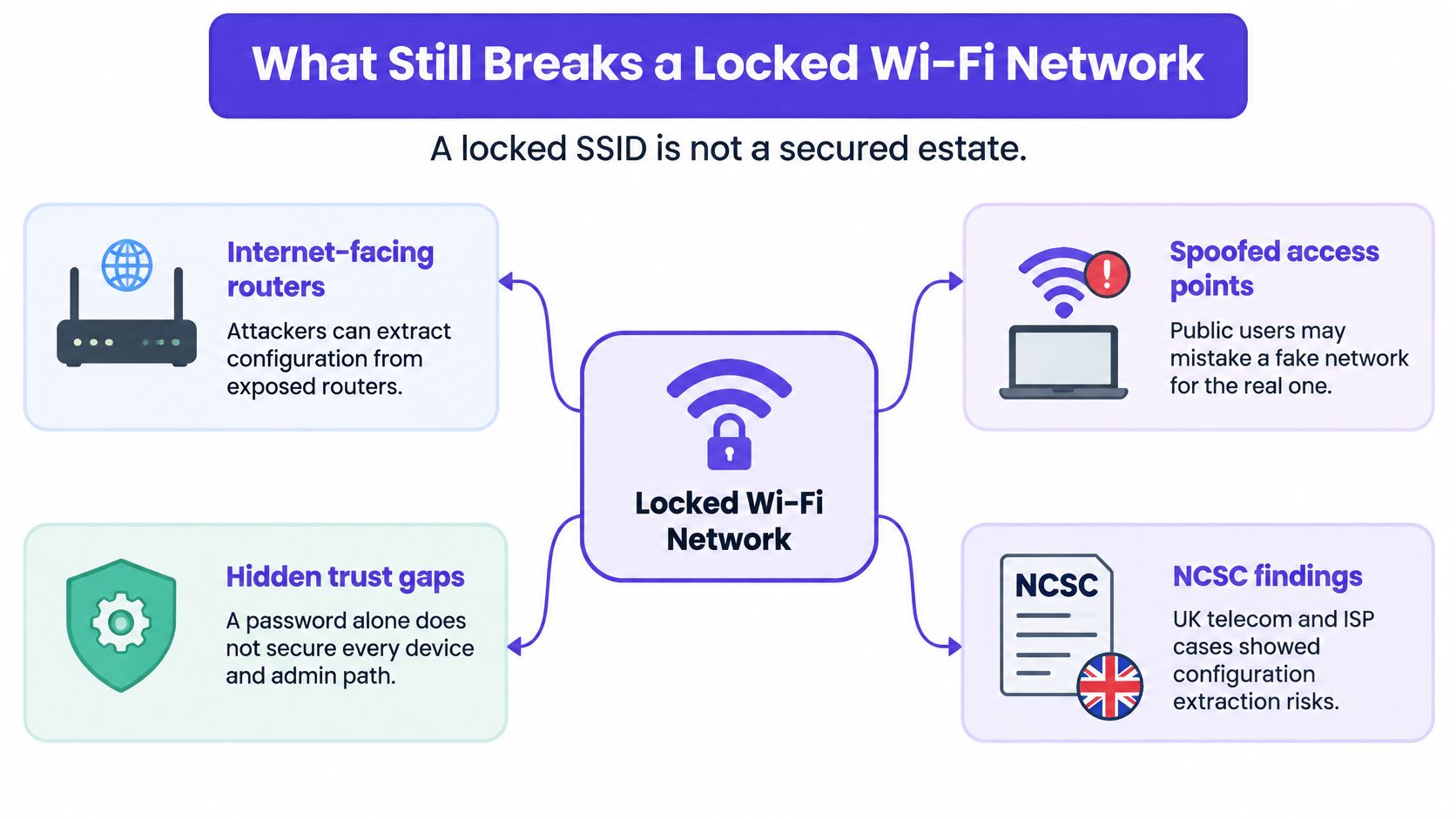
Yes, a network with WPA3 and a strong passphrase can still be compromised. The attacker doesn't need to join your SSID if the box that creates that SSID is reachable, unpatched, or still using default administrative credentials. That's the meeting answer MSP engineers should give before anyone discusses passphrase length.
The National Cyber Security Centre UK internet edge router advisory reported router compromises in telecommunications companies and ISPs where attackers extracted configuration files from internet-facing network devices. A separate warning described hostile actors scanning for routers using default or weak SNMP credentials and exploiting known management-interface vulnerabilities, putting communications, healthcare, finance, government and other critical sectors at risk. Those attacks target firmware, remote administration, DNS settings, and monitoring protocols, not the wireless password.
Think of the estate as four layers. Radio encryption stops passive sniffing of wireless frames, but it can't stop a rewritten router configuration. Identity stops the shared key problem, where one passphrase serves every leaver, contractor, and visitor who's ever photographed a whiteboard. Segmentation stops a guest or IoT device reaching internal systems. The management plane stops the attacker who never associates with an SSID at all.
| Layer | Failure if skipped | Control | Owner |
|---|---|---|---|
| Radio encryption | Passive sniffing of wireless frames | WPA3 where clients allow it, WPA2 only as a documented fallback | MSP with the customer |
| Identity | Shared key with no individual offboarding | 802.1X with per-user or per-device credentials | Customer identity provider, enforced by the MSP |
| Segmentation | Guest or IoT devices reaching corporate systems | Separate SSID, VLAN and a deny rule toward internal ranges | MSP |
| Management plane | Stolen router config, weak SNMP or an internet-facing admin interface | No public management, rotated admin credentials, SNMP removed or locked to a management host | ISP, MSP and customer, named in the contract |
That table is a policy document, not a product list. You can't buy your way out of an unnamed owner. If the ISP supplies the edge router, the MSP runs the controller, and the customer holds the identity provider, write down who patches what, who rotates administrative credentials, and who checks that SNMP isn't answering from the internet.
Practical rule: If nobody can name who owns the router admin account, you don't have a wireless design yet. You have a survey and a hope.
Agree these in the managed-service schedule before you place access points.
An independent check helps prove those lines are real. The guidance at NZ Apps on penetration testing is useful context when you commission testing that looks beyond the SSID and probes exposed management services, weak credentials, and paths between VLANs.
Finish with a one-line client test. Can the customer point at every SSID and say who joins it, which VLAN it lands on, and who gets called if the controller is reachable from outside? If they can't, the estate isn't secured, however strong the passphrase looks. An identity overlay can't paper over a missing owner, and a new access point can't fix an exposed management interface.
Separation sounds basic, yet it's slipping even where budgets are largest. In the Cyber Security Breaches Survey 2025/2026, 85% of large UK businesses reported having a separate Wi-Fi network for staff and visitors, down from 93% in 2024/2025, a decline of 8 percentage points. Treat that drop as a project backlog, not a footnote. Guest devices sit outside your control, so they shouldn't be able to reach staff resources just because they associated successfully.
| Role | Authentication | VLAN | Allowed destinations |
|---|---|---|---|
| Staff | WPA3-Enterprise with 802.1X | Corporate staff VLAN | Directory services and approved business apps |
| Guest | Per-visit identity, not a shared key | Guest VLAN | Internet only, no internal RFC1918 ranges |
| IoT | Certificate or a key unique to that device class | IoT VLAN | Named vendor services only |
| Residents | Per-unit credential or in-app network pass | Isolated tenant VLAN | That unit and the internet, not neighbouring units |
| Operators | No user SSID | Management VLAN | Controllers and access points from an admin jump host only |
Say a small shop puts tills, card terminals, staff phones, and the customer SSID in one broadcast domain because the original installer only had one switch port to spare. A customer laptop can discover the till, a compromised camera can scan the back office, and nobody can explain which rule should have stopped it. The fix isn't a longer passphrase. It's a till VLAN with narrow payment and update destinations, a staff VLAN for business systems, and a customer VLAN with client isolation and no internal route.
Student housing shows another version. Residents expect their phone, television, console, and printer to find each other, but they shouldn't discover the flat next door. A shared building-wide PSK creates one crowded neighbourhood. A per-unit credential creates a private boundary while keeping the resident experience familiar.
Trace the packet, not the marketing diagram. If you can't show where a guest packet is denied, the deny rule is an intention, not a control.
A cloud overlay can publish SSIDs and apply the role consistently across sites. It doesn't replace the switch trunk, the VLAN assignment, or the firewall rule underneath. Check those locally at each site, especially where an ISP router, an unmanaged switch, or a legacy controller still bridges traffic in ways the portal can't see.
Before you leave, associate with the guest SSID and one IoT test device. Record the address each receives, the VLAN tag, the destinations that work, and the internal address that correctly fails. That short record turns separation into evidence the client can audit.
One WPA2-Personal key on a whiteboard is still the design engineers inherit most often. It has no name attached, so you can't tell who used it. Offboarding means changing it on every access point, laptop, phone, printer, and handheld scanner, which is why sites postpone the change until the key has travelled far beyond the current staff list.
For staff, Northern Ireland Cyber Security Centre business guidance describes cryptographic certificates with 802.1X and WPA2/3-Enterprise as an effective way to make unauthorised device connections harder. The staged design is clear: disable open, WEP, and legacy WPA networks, use WPA3 where clients support it, authenticate staff with certificates, separate guest and IoT traffic, and block lateral access with firewall rules.
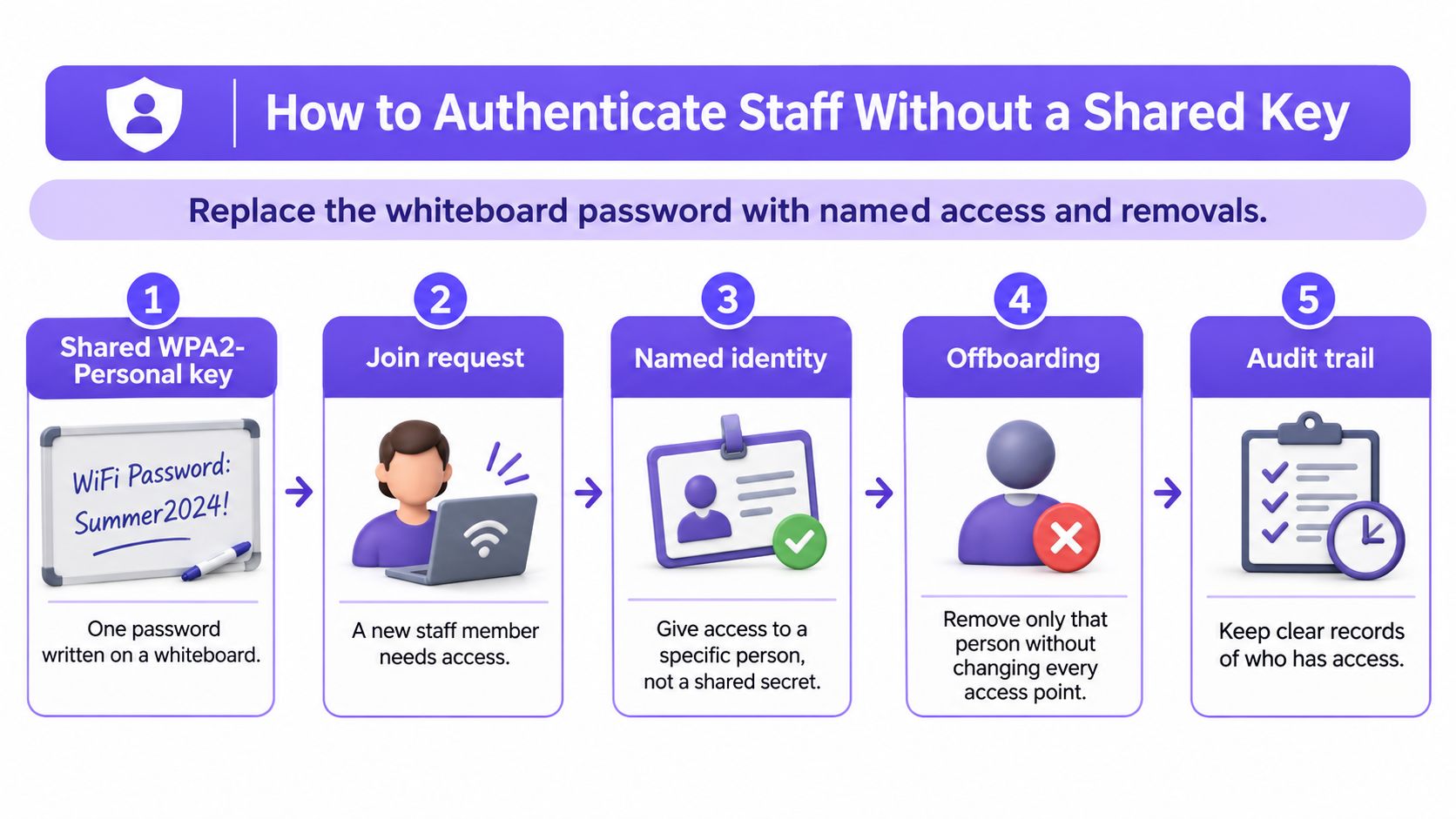
Connect a known laptop with a valid certificate and confirm it lands in the intended VLAN. Then try an unregistered certificate and confirm the RADIUS server rejects it. Disable a test account in the directory, force a reassociation, and confirm access stops. Try to reach a VLAN the test identity wasn't assigned and save the denied result.
Don't use a captive portal as staff authentication. A splash page checks a browser session. It doesn't authenticate the device before association, doesn't give you a certificate to revoke, and doesn't by itself stop lateral movement. MAC filtering has the same weakness in a different costume, because an attacker can copy a permitted address.
Protected Management Frames, required with WPA3, reduce forged deauthentication and disassociation attempts. That's valuable, but it still doesn't identify a person. Keep the layers separate in the design document so the client doesn't mistake a radio feature for an identity control.
Close the job with runbook entries an on-call engineer can use at 2 a.m. Record the directory name, RADIUS service, certificate authority, certificate lifetime, renewal owner, fallback device list, and the ticket type that fires on repeated enterprise association failures. Staff WiFi uses WPA3-Enterprise with automatic device provisioning and revocation tied to the customer's identity provider, through the Purple app, with no shared passwords. The access points still enforce 802.1X, so test enforcement on the hardware, not just in a portal screenshot.
Visitors face a simpler problem than engineers do. They see two similar SSID names in a busy venue and must guess which one belongs to the business. In a 2026 survey of 3,000 UK adults, 32% were not confident they could distinguish a secure public Wi-Fi network from a spoofed one, 20% took no precautions before joining public Wi-Fi, and 16% did not know what warning signs to look for. A shared guest password doesn't solve that trust problem.
The key gets photographed at reception, shared in reviews, and kept by contractors after the job ends. You can't revoke one person without inconveniencing everyone. Worse, a password says nothing about whether the guest VLAN can reach printers, tills, building controls, or staff laptops.
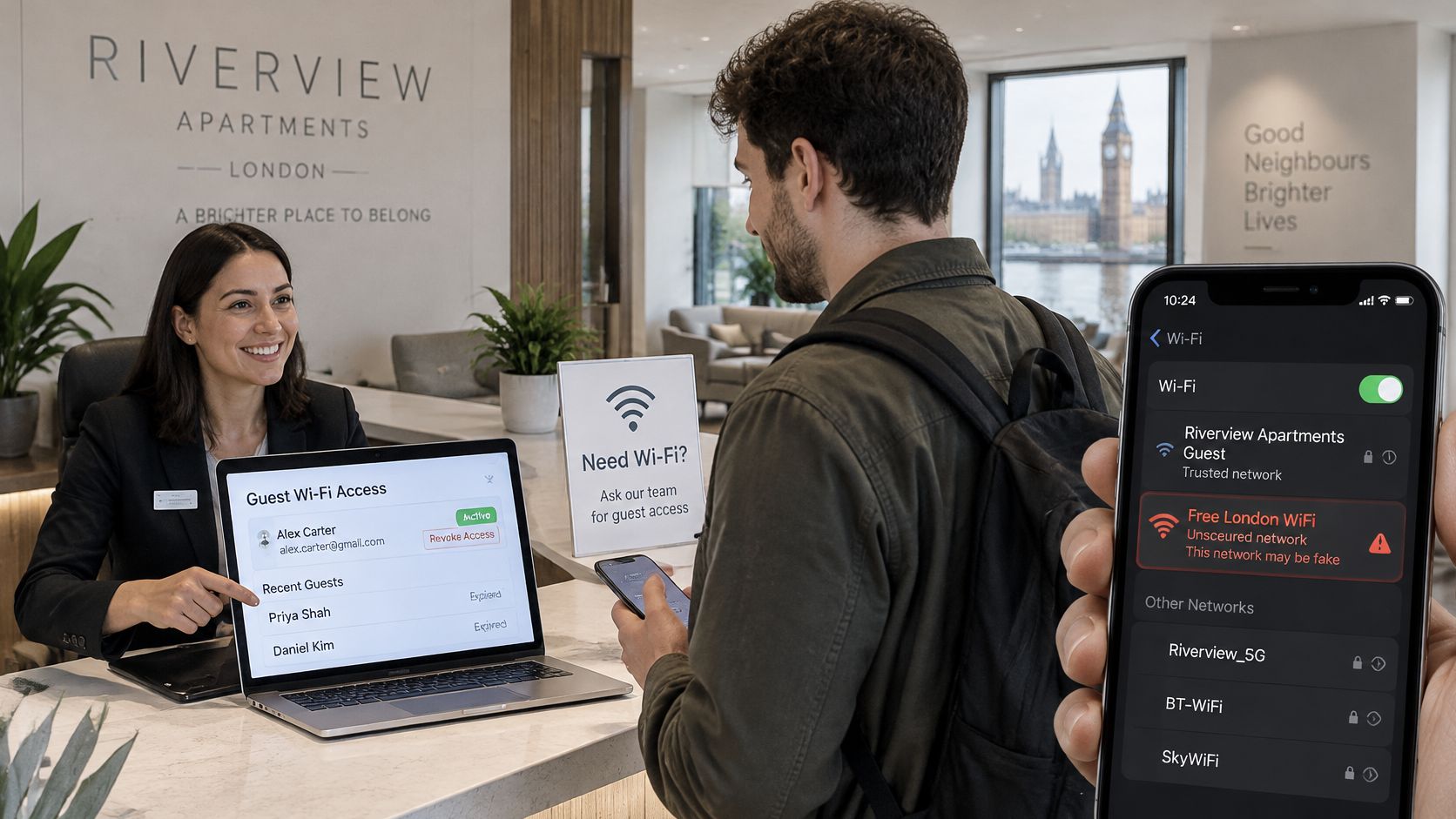
Give the visitor a network name that matches the venue signage. Give them an identity that belongs to one person or one unit, not the whole building. Give the session an end time that the MSP can audit. Staff should be able to explain those signals in one sentence at reception, because confident users are less likely to join a convincing twin in the car park.
For cafés and retail chains, use a branded journey that records consent where personal data is captured, places the client in an internet-only VLAN, enables client isolation, and expires access the same day. Queue signage should show the exact SSID name. The till network stays separate even if the store manager asks for a quick bridge during a till outage.
Holiday lets make the same point in miniature. Operators who simplify guest arrivals with self check-in still need Wi-Fi credentials that change with the booking rather than a house key that every former guest retains. Arrival convenience and revocation should be designed together.
In a hospital or clinic waiting room, patient access must stay away from staff systems and clinical devices. Treat the splash page as notice, consent, wayfinding, and analytics. The firewall and VLAN do the security work. Test that a phone on the patient SSID can't discover printers or reach staff application ranges, and keep that test result with the site record.
Build-to-rent and student properties need longer-lived access with household privacy. Give each unit its own network so phones, laptops, televisions, consoles, and other browserless kit see each other inside that unit but not next door. A resident should be able to add a guest without handing over a building key. When the tenancy ends, disable that unit's pass and only its devices drop. No corridor notice, no site-wide password reset, and no helpdesk queue of neighbours reconnecting televisions.
Our notes on automatic Wi-Fi access revocation are useful when a client asks how departure should remove access without a manual password change. Whatever platform you use, revocation must reach the association itself. Removing a name from a spreadsheet while the old key still works is administration, not security.
Keep evidence proportionate and clear. Retain who joined, which SSID they used, when access started, when it expired, and the consent record if personal data was captured. Agree retention and access to those records in the service contract. That's what lets an MSP answer an incident question without exposing a building full of unrelated visitors.
A design becomes real at go-live, then drifts. New access points inherit old templates, a busy site defers firmware, and a temporary bridge survives the project that justified it. Run the same hardening checks at handover and repeat them every quarter so drift shows up as a failed test rather than an incident.
The ICO Wi-Fi security guidance warns that unsecured Wi-Fi can expose private information and recommends WPA2, with WPA3 preferred when supported, alongside disabling device auto-connect. The NCSC position in that guidance is equally important: treat networks as untrusted bearers and protect sensitive data with application-layer TLS, plus IPsec where appropriate, rather than relying on Wi-Fi alone.
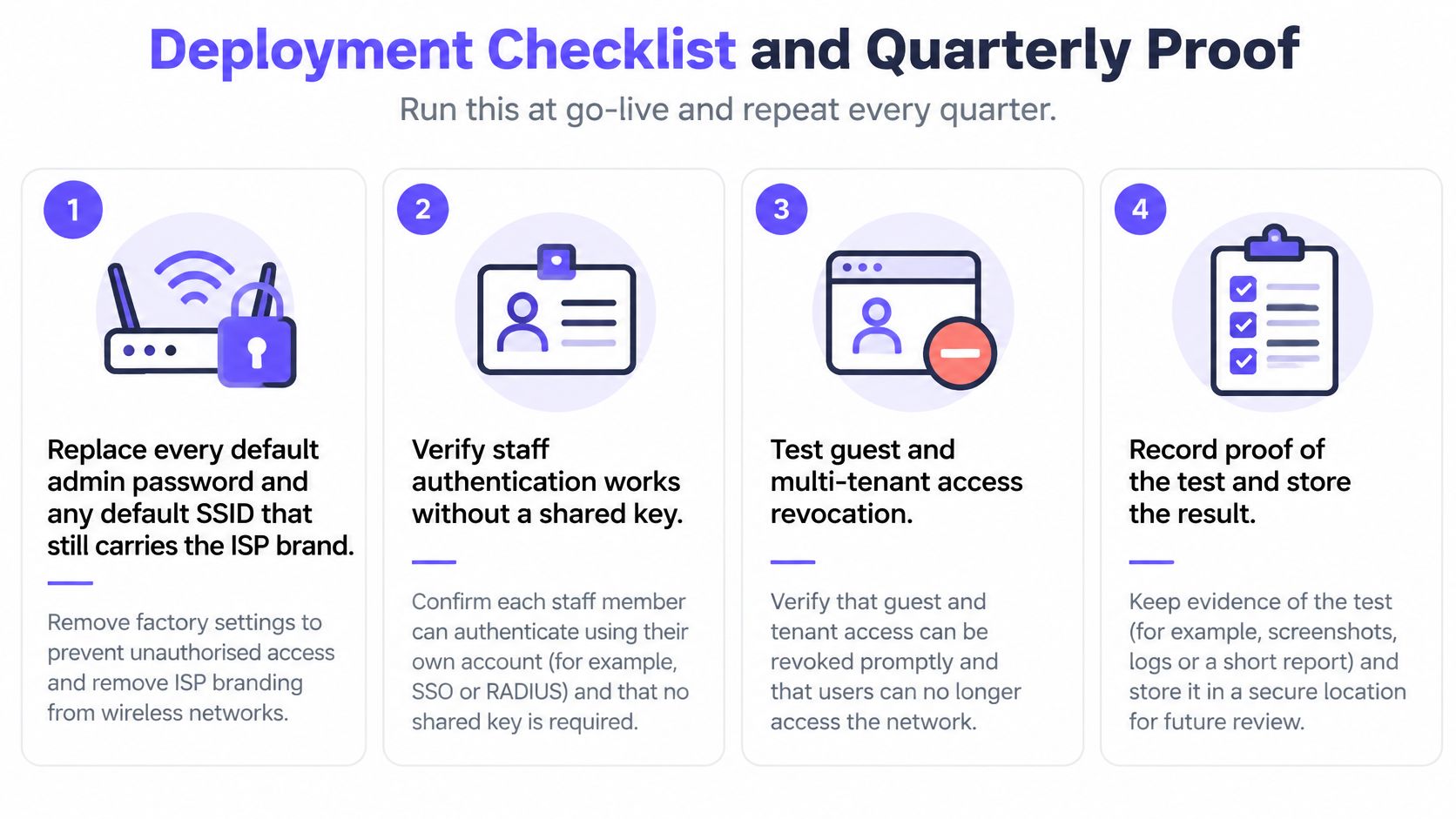
| Test | Pass mark | Evidence |
|---|---|---|
| Production encryption | 100 percent of access points on WPA2 or WPA3, with no open, WEP or legacy WPA | Controller encryption report |
| Management exposure | 0 percent of guest VLANs can reach access-point or controller admin | Firewall rule and scan |
| Unknown certificate | Association rejected | RADIUS log |
| Revoked staff identity | Fails on the next association | Directory event and RADIUS log |
| Guest to corporate | No path from the guest VLAN to internal RFC1918 ranges | Policy test from a guest client |
| IoT least privilege | Device reaches only its named services | Firewall log for that device class |
| Rogue or twin SSID | Alert raised and ticketed in the quarter | Wireless scan or analyser log |
Score each test as a pass, a fail, or an accepted exception. Store the result with the contract and send the table to the client. These are internal control targets, not UK-wide benchmark statistics, so don't present them as national averages. Their value is repeatability across quarters and sites.
Watch for familiar field slips on every visit. Auto-join is left on a replacement laptop, a guest SSID is bridged to the office LAN for an event, firmware is postponed because trading hours ran late, or a new camera joins the staff VLAN because the installer already knew that key. Name the slip, fix it during the visit where you can, and retest the affected path.
A clean radio report doesn't replace TLS on applications. Wi-Fi remains the bearer. Quarterly proof shows that the bearer, identity checks, VLAN boundaries, and management plane still match the signed design.
Wireless incidents rarely arrive labelled as security events. The call says the Wi-Fi is slow, a customer has spotted the venue SSID in the car park, or a guest can suddenly see a printer. Your first hour should preserve evidence before anyone helpfully reboots the controller and clears the scene.
Tickets stall when logs sit with three parties and nobody owns the request. Put the split in the incident runbook before you need it.
Agree in the contract how long you'll retain authentication failures, rogue SSID alerts, certificate events, configuration changes, and unusual association bursts. Retention must be long enough for a client, landlord, insurer, or regulator to ask a sensible question after the event. It also needs access control, because association logs can identify people and movements.
Do not let a reboot become your incident response. Preserve first, contain deliberately, then restart what still needs restarting.
Separate containment from speculation in ticket notes. Write what you observed, what you disabled, what test proved the path closed, and what remains unknown. Avoid naming a suspect person from a MAC address alone, since devices can be shared, spoofed, cloned, or stolen.
Close with a one-page incident note the account manager can send without translation. State what was seen, what was cut off, which SSID was proved clean, which patch or rule still needs work, and when the follow-up test will happen. Attach the small evidence pack, not a full log dump. Clients remember whether you could show them the boundary held, not whether you used the fashionable incident terminology.
Pick one live site and make it provable. That's a better next sale than another box of access points.
Choose a branch with an existing staff directory, a venue with regular guests, or a residential block where per-unit access is already causing tickets. Book half a day with the client watching. Fill in the customer, MSP, and ISP against radio encryption, identity, segmentation, and the management plane. Run the quarterly tests on site and record every pass, fail, or accepted exception.
The signed baseline becomes the deliverable. It names SSID roles and VLANs, the directory used for staff access, guest and resident expiry rules, who patches the router, who holds administrative credentials, and what arrives in the quarterly pack. Attach it to the first review and you've turned a one-off survey into a retained service.
Purple can sit as the cloud overlay on hardware the client already owns, handling staff provisioning and revocation through the customer's identity provider and onboarding for guests and residents. VLAN and firewall rules stay on the client's switch and firewall, where your engineers can test them. Purple Partners is the channel programme for resellers, MSPs, and systems integrators selling identity-based WiFi solutions, and partners receive thorough training, an enablement portal, and access to a dedicated support team.
The decision in the room is simple. If the client can revoke one person, keep guests off the corporate LAN, and name who owns the management plane, the estate is ready to manage. If they can't, fix those three lines before selling more radios.
Turn shared passwords and unmanaged guest access into named, revocable connectivity across staff, visitor, and multi-tenant estates with a hardware-agnostic overlay your customers can adopt without replacing their wireless infrastructure. Visit Purple to explore the partner programme, training, and enablement for your next signed wireless baseline.
Join 80,000+ venues already running on Purple. No targets, no minimums, just bigger deals.