WPS in WiFi: What It Is and Why to Disable It
WPS in WiFi is a one-press pairing shortcut with a crackable PIN. Learn how the attack works, why MSPs disable it, and which access controls replace it.
What is role based access control? Learn how roles, permissions and sessions work, how RBAC compares with ABAC and PBAC, and how to roll it out on WiFi.
Role-based access control assigns permissions to roles, and users gain access by holding a role. On a WiFi network, that means someone's identity determines which resources they can reach, rather than everyone receiving the same access through a shared password.
You might be onboarding a receptionist, extending a contractor's access and removing a former employee from a customer's network on the same morning. The difficult part isn't getting those people connected. It's making sure their access changes when their circumstances do, including when they're already connected.
Think of a hotel key card. A guest's card might open their room, the gym and the car park, but not the kitchen or the manager's office. At checkout, the hotel should stop accepting it.
Role-based access control, or RBAC, applies a similar idea to digital resources. Instead of configuring every person's permissions individually, an administrator defines a role with an approved bundle of access, then assigns eligible identities to it.
Say a venue's finance employee needs the accounting application and a protected document store. The administrator assigns the employee to Finance Staff. That role carries the relevant permissions, without also granting access to switch configuration or the reception booking system.
The NCSC's secure user management guidance describes fine-grained permissions for human or machine identities, restricted to the resources necessary for their roles. It also recommends a coherent access-control mechanism, removing unused permissions and time-bounded privileges for highly sensitive administrative tasks.
The underlying rule is least privilege. Staff, contractors, partners and administrators should receive only the access needed for legitimate duties, not everything they might conceivably find useful.
A job title alone isn't a good permission specification. An operations manager might need reporting access across venues without needing to change wireless controller settings. An MSP technician might need temporary maintenance access without receiving permanent access to customer business applications.
Practical rule: Define a role by the work someone must perform, then justify each resource it allows them to use.
Authentication establishes identity. Authorisation determines what that identity can do after authentication.
A successful WiFi sign-in therefore shouldn't imply unrestricted access to everything reachable from the wireless network. The network can place the identity into an appropriate segment, while applications apply their own permissions to records and functions.
The hotel analogy also has a limit: a network session may remain active after the underlying permission changes unless the infrastructure enforces that change. A sound design must connect the permission, the role, the identity and the active session, rather than treating successful sign-in as the end of the decision.
A useful way to understand RBAC is to start with the smallest decision: may this identity perform this action on this resource? Everything else organises those decisions so administrators can manage them consistently.
Say a finance employee arrives with a managed laptop. Their directory identity, assigned role and wireless session all contribute to the access they receive, but they're not interchangeable.
A permission is an allowed action on a resource. Reading an internal HR portal is different from editing its records, and reaching an application over the network is different from having permission to use every feature inside it.
A role bundles related permissions into something an administrator can assign and review. Finance Staff might include access to finance applications and the finance VLAN, but the application still needs to enforce its own read, edit and approval rules.
RBAC components and how they apply to staff WiFi
| Component | What It Does | Staff WiFi Example |
|---|---|---|
| Permission | One allowed action on one resource | Read access to the internal HR portal |
| Role | A named bundle of permissions | Finance Staff: finance applications and finance VLAN |
| User | A unique person or managed-device identity | A named employee on a managed laptop |
| Session | A time-limited period of access granted at sign-in | Laptop stays on the staff network for the working day, then expires |
A directory group is often the practical way to assign a role, but it isn't automatically a complete security policy. Someone must map that group to the correct permissions in the systems that enforce access.
A user is an identifiable actor. For staff, that normally means a named directory account; managed devices can also have their own identities. Don't confuse the employee identity with the laptop identity, because a valid employee account doesn't prove that the connecting device is approved.
Shared credentials weaken attribution. If everyone authenticates with the same password, the authentication record alone can't establish which individual performed an action.
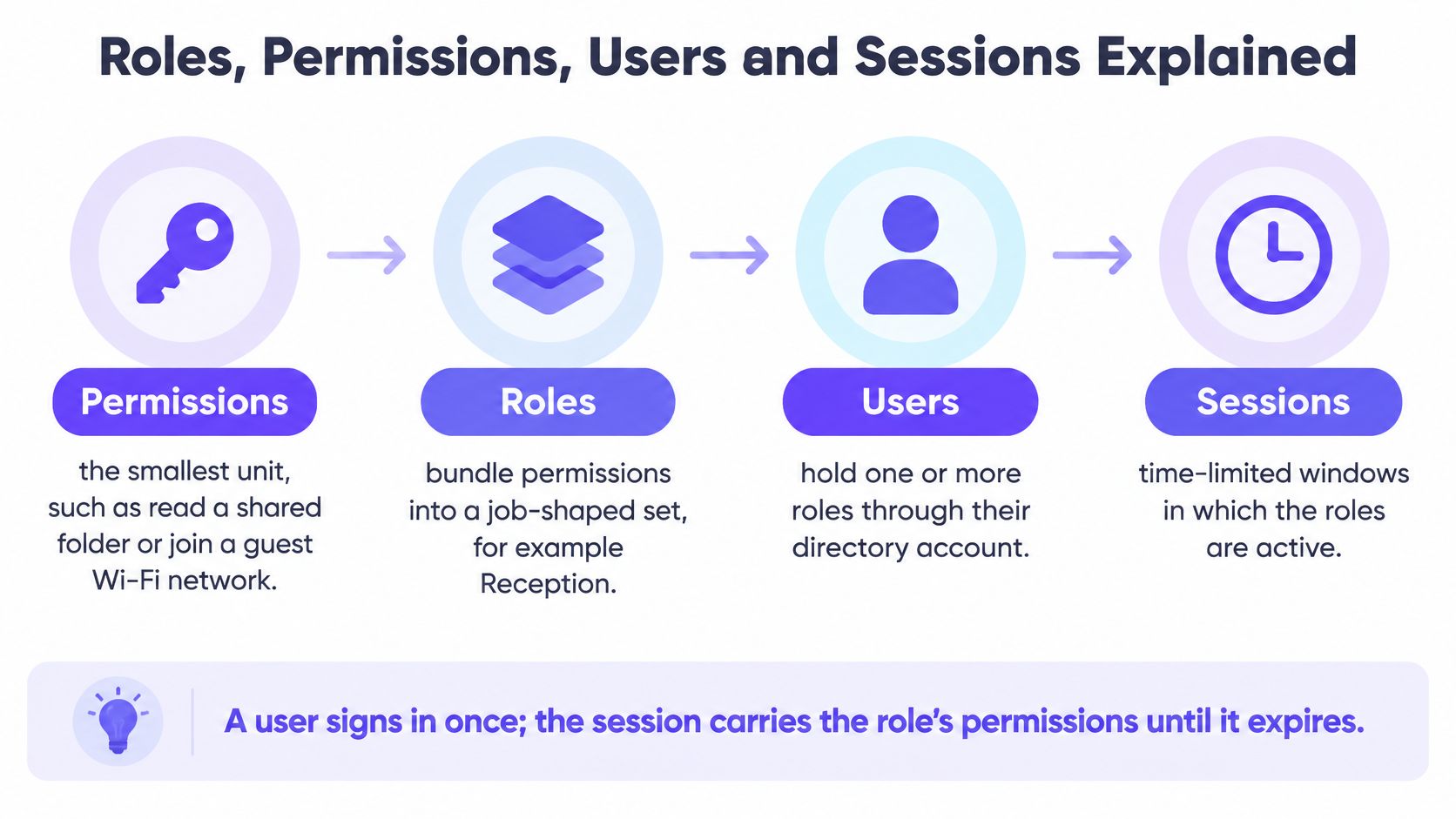
A session is an active period of access established after sign-in. You can configure a laptop's staff session to expire after the working day, but expiry and revocation need explicit enforcement. Disabling an account doesn't necessarily disconnect an existing wireless session immediately.
Single sign-on can simplify authentication across services. It doesn't replace role assignment, application authorisation or network session controls.
Changing a role's permission definition can update access for everyone assigned to it, wherever the connected systems enforce that definition. That's useful across customer sites, but it also makes a poorly reviewed change consequential.
Run this practical inventory:
| Model | Decides On | Administration | Main Strength | Main Weakness |
|---|---|---|---|---|
| RBAC (role-based) | The user's assigned role | Define roles, then assign users to them | Simple to audit and scale | Role explosion when exceptions multiply |
| ABAC (attribute-based) | Attributes such as department, device health, location and time | Write rules over attributes | Handles context and exceptions | Harder to model and test |
| PBAC (policy-based) | A central policy weighing roles, attributes and context | Maintain one policy engine | Consistent policy across systems | Needs mature governance and tooling |
These terms describe different ways of expressing access decisions, not necessarily competing products. A policy engine can use roles and attributes together, and suppliers don't always use PBAC consistently. Inspect the actual decision rules rather than relying on the label.
Say a contractor needs a project application while working at a venue. Under a basic RBAC design, the Contractor role grants access to that application.
The contractor later connects using an unmanaged personal laptop. Their assigned role hasn't changed, so a role-only decision may still allow access even though the venue requires a managed device.
Attribute-based access control, or ABAC, can add that condition: permit the Contractor role only when the device meets the required management state. Another condition might restrict access to an approved location or maintenance window.
The NCSC's identity and access management guidance asks organisations to consider who needs access, why they need it and under what circumstances, including different categories of users and factors such as location and time. That's a useful test of whether a role-only design captures the customer's actual requirements.
A common workaround is to create increasingly specific roles: Contractor Onsite, Contractor Offsite, Contractor Managed Device and Contractor Evening Maintenance. As combinations multiply, administrators struggle to explain which role wins or whether an old assignment remains necessary.
This is role explosion. Keep durable responsibilities in roles and express changing conditions separately when your enforcement platform supports them.
Policy-based access control can bring those decisions into a centrally managed policy. However, a central engine only helps if the connected systems enforce its decisions and the attributes feeding it are trustworthy.
Assigning the correct role once doesn't establish least privilege for the rest of someone's employment, contract or tenancy.
Before adding an attribute, decide what happens when it's unavailable or stale. If device compliance can't be confirmed, should the user enter a restricted remediation network, receive internet-only access or be denied? Test that failure path deliberately.
For most WiFi estates, start with RBAC and add attributes where context changes the outcome. A small, understandable policy is easier to operate than a complex rule set nobody can troubleshoot during a venue outage.
The first operational benefit is consistency. A new starter's access can follow an approved group assignment rather than an engineer copying settings from a colleague whose account may already contain unnecessary privileges.
The same structure helps during departures and internal transfers, provided the organisation connects those events to its access systems. Check an actual joiner and mover record, not just whether an automation connector says it's healthy.
The NCSC's Cyber Essentials requirements require accounts to belong to authorised individuals and provide access only to applications, computers and networks needed for their role. Accounts must be removed or disabled when no longer required, and special privileges withdrawn when someone changes role.
That makes RBAC an ongoing governance task rather than a configuration exercise. If a receptionist moves into finance but retains reception administration indefinitely, the organisation has changed the person's job without completing the access change.
Verify both additions and removals. A successful transfer should show the newly approved access and the withdrawal of permissions that no longer have a business purpose.
Useful logs connect a named identity to its assignment, the decision applied and the eventual removal. Record the relevant resource, role, time and outcome, so an investigator can distinguish a rejected request from an approved session.
Provisioning logs alone aren't enough. An account can be removed from a group while an existing network session remains usable, so retain evidence from the enforcement layer as well.
For personal-data systems, document who reasonably needs access, reconcile that record with technical permissions and apply strong authentication to privileged users. RBAC supports those activities, but an RBAC feature doesn't make an organisation compliant by itself.
A compromised administrator account can expose management functions that ordinary users can't reach. Keep administrative identities separate from everyday accounts and make privileged access temporary where practical.
RBAC also needs a secure enforcement environment. Include controller administration, firmware maintenance and management-plane restrictions in your access point security checks.
Finish each review with a direct comparison: does every role have a documented business need, and do its actual permissions match that documentation? Any mismatch needs an owner and a corrective action.
Inventory directory groups and job functions. Export relevant memberships and identify the responsibilities they represent, including contractors, visitors and administrators. Don't assume existing groups are suitable access roles, because mailing lists and legacy project groups often have different purposes.
Define roles around distinct access needs. Separate groups only where the permitted resources or actions differ, and keep the role catalogue manageable enough for a quarterly review. Creating a role for every employee hides individual permissions behind role names rather than simplifying them.
Map roles to enforced network boundaries. Use a staff VLAN, an internet-only guest network and isolated tenant networks where appropriate, with firewall rules controlling permitted paths. Don't temporarily map a restricted role to a broad internal VLAN without an approved expiry and removal task.
Connect directory membership to network policy. Configure your authentication service and wireless infrastructure so the approved group determines the intended role at connection. A network access controller can help coordinate these decisions, but test group precedence when someone belongs to overlapping groups.
Separate ordinary and privileged authentication. Require unique identities and strong authentication for management access, with administrators using different accounts for daily work. A personal staff login shouldn't inherit controller configuration rights merely because its owner works in IT.
Set a deliberate device requirement. In the UK Government's Cyber Security Breaches Survey 2025/2026, 64% of UK microbusinesses required access only through company-owned devices, up from 58% in 2024–2025. Where the customer requires managed devices, enforce that as an additional condition rather than assuming directory authentication proves device ownership or health.
Pilot permitted and prohibited access. Test a representative identity from each role against resources it should reach and resources it must not reach. Include expiry, account disablement and existing-session termination, not just successful sign-in.
Treat this table as an example target state, not a universal configuration. Each customer must approve the resources behind the segment names and the authentication method appropriate to the use case.
| Role | Network Segment | Access Granted | Authentication |
|---|---|---|---|
| Staff (managed device) | Staff VLAN | Business applications on the internal VLAN | Directory login with device certificate |
| Contractor | Contractor network | Named project systems only | Directory login with time-limited account |
| Guest or visitor | Guest network | Internet only, for a set period | Terms acceptance or email validation |
| Tenant | Private network per unit | Own unit only, isolated from neighbours | Unique device credential per unit |
| Network administrator | Management VLAN | Controller and switch configuration | Named account with multi-factor authentication |
Terms acceptance isn't proof of a guest's identity, and email validation doesn't establish that a visitor should reach internal systems. Those methods suit the limited guest access shown here, not staff or administrator privileges.
The deployment flow below provides a visual reference for organising the work.
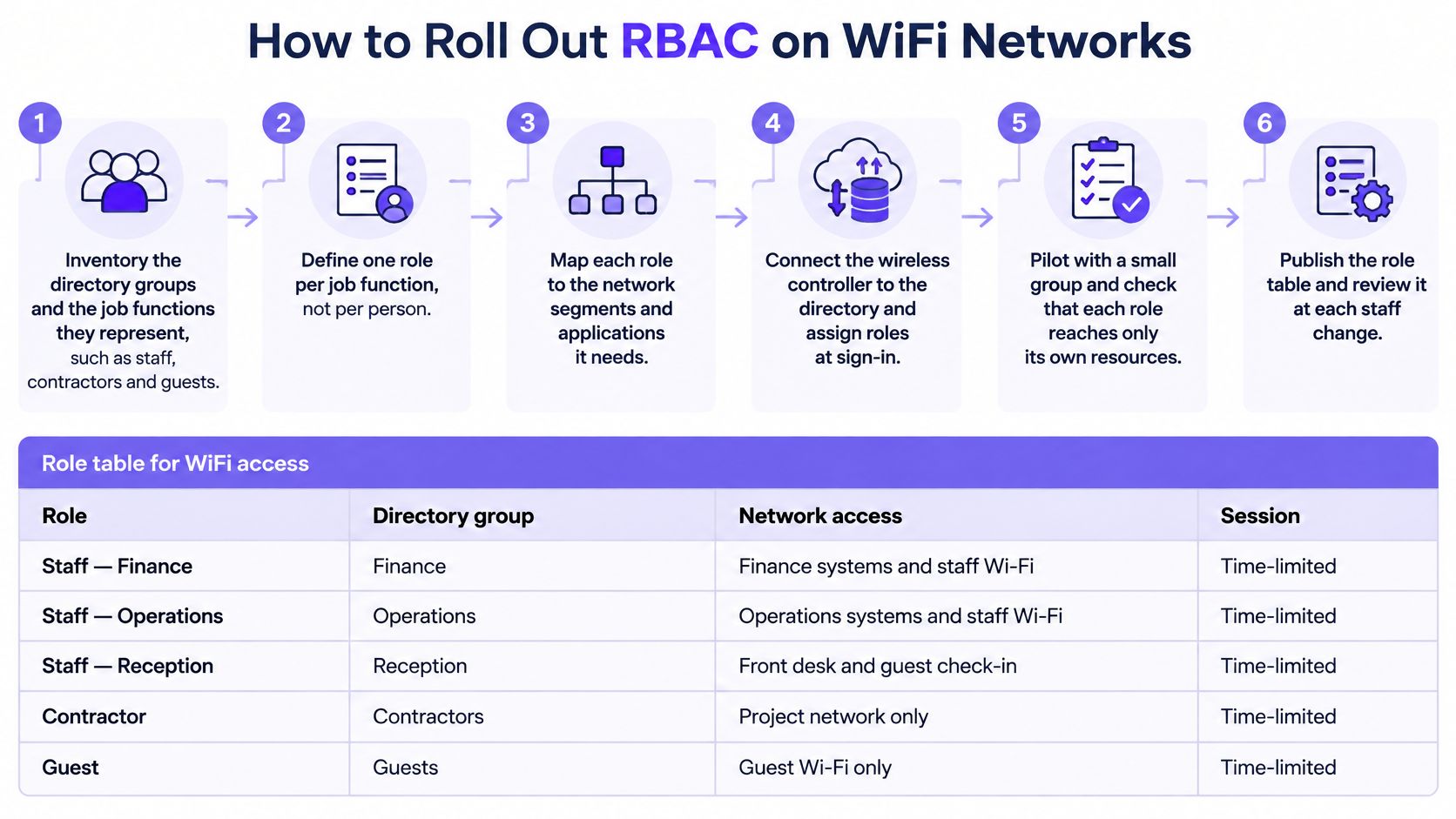
Give every table row a named business owner and a technical owner. The business owner approves the need; the technical owner verifies enforcement.
Also define who handles an unexpected assignment. If a contractor lands on the staff network, the service desk needs a safe containment action and an escalation route, not permission to broaden access until the connection works.
Consider a hospitality group with finance, operations and reception teams. A new receptionist authenticates with a named directory account and receives the access approved for front-desk work, without anyone handing over a building-wide staff password.
The receptionist can reach the booking service but can't browse finance resources or configure switches. If they provide temporary cover elsewhere, a separately approved assignment can carry an expiry rather than becoming a permanent addition.
At departure, the acceptance test is that their existing connection stops working and the device can't establish another authorised staff session. Deleting a name from an employee list isn't sufficient evidence.
The office setting below illustrates the kind of shared workplace where individual identities matter.

A café visitor accepts the guest terms and receives internet access for a configured period. The guest role doesn't include the till network, back-office systems or other visitors' devices.
The café operator should test this from a visitor's handset, not infer isolation from the guest network's name. A separate wireless network name is a connection choice; firewall and client-isolation settings establish the actual boundary.
When the allowed period ends, the session expires according to policy. If returning visitors can reconnect, the café should define whether that creates a fresh session and what conditions apply.
A resident receives access to a private network associated with their unit. Their laptop and browserless devices can use the services allowed within that private environment without becoming reachable by neighbouring residents.
The tenancy lifecycle matters as much as initial onboarding. At checkout, the operator must retire the outgoing resident's access and ensure credentials or device assignments don't carry into the next tenancy.
Acceptance test: A new resident shouldn't inherit the previous resident's connectivity, and a former resident shouldn't retain access after checkout.
These scenarios differ in who holds the role, what it permits and what event ends it. The staff member's employment record, the visitor's session policy and the resident's tenancy record provide different triggers.
For an MSP, that suggests a reusable service design without pretending every venue is identical. Document the authoritative identity source, permitted resources, expiry trigger and enforcement test for each use case, then adapt those details to the customer.
Use the checklist as an evidence record. Each completed item should point to an export, test result, approval or log entry rather than a verbal assurance that access looks correct.
The visual checklist can support handover discussions, but retain the evidence and named owners in your operational records.
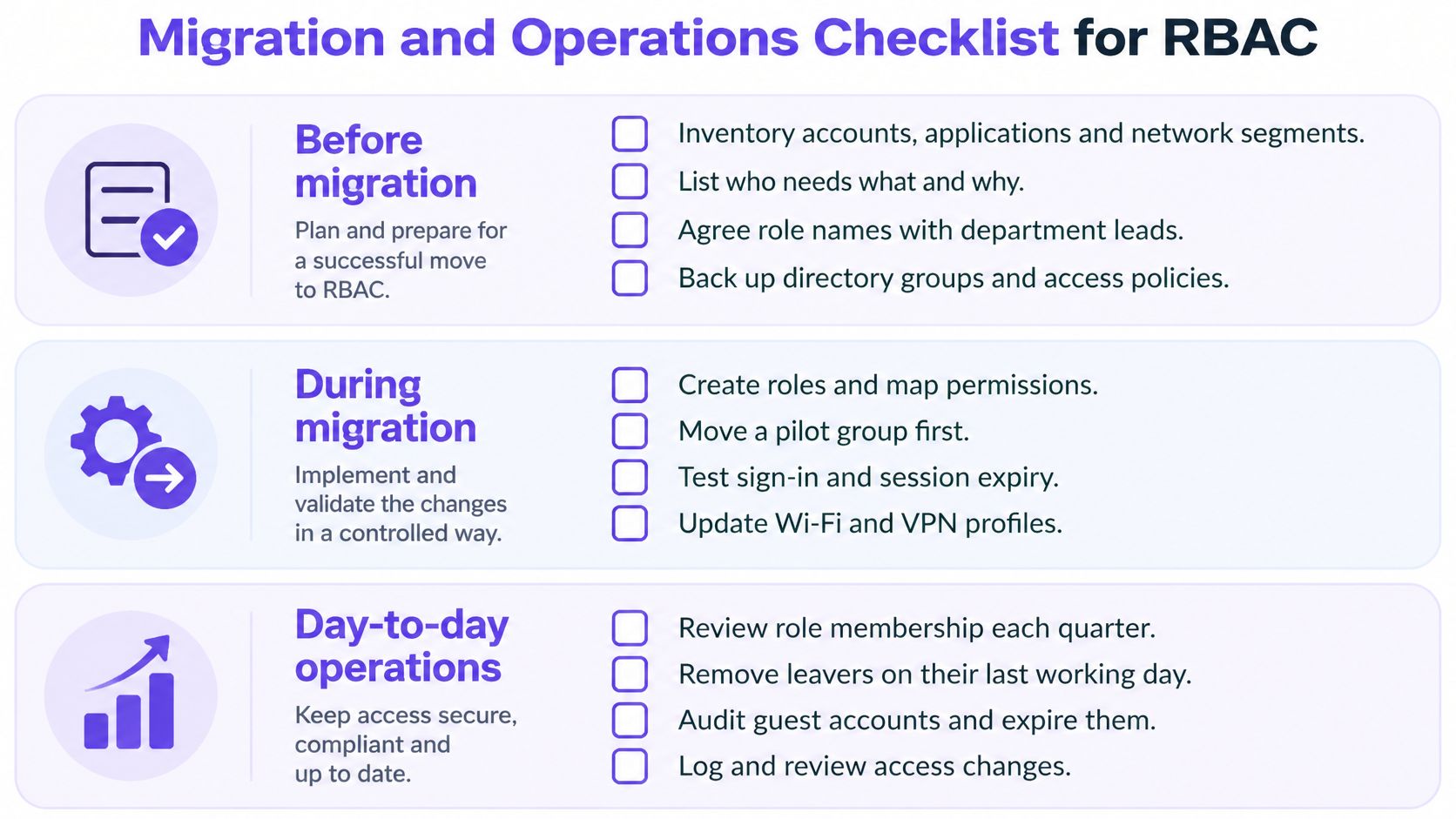
Assign a named owner to every checklist item. Where the customer and MSP share responsibility, specify who initiates the change and who confirms that enforcement succeeded.
For most managed WiFi networks, a compact RBAC model covering staff, contractors, guests and administrators is a sensible starting point. Add device, location or time conditions where those signals change whether access should be allowed.
Start by exporting current directory groups and listing shared accounts. Choose a bounded pilot, such as staff WiFi at a representative venue, rather than attempting to replace every access path simultaneously.
For a platform evaluation, establish how identity changes reach the network, how guest and tenant boundaries are enforced, and whether the deployment supports the customer's existing infrastructure. Record the supported hardware and configuration requirements before approving migration.
Our Staff WiFi uses WPA3-Enterprise, with staff signing in through SSO in the Purple app using a certificate-based profile, with access on every device. Automatic device provisioning and revocation are tied to the customer's identity provider, without shared passwords; our Multi-tenant WiFi provides a private network per tenant with secure per-unit isolation.
We deploy on existing infrastructure from Cisco, Cisco Meraki, HPE Aruba Networking, Ruckus Networks, Extreme Networks, Juniper Mist and Ubiquiti. Confirm the customer's specific equipment and intended design during discovery rather than treating a vendor name as a complete compatibility test.
Make live revocation part of acceptance: disable a connected test identity, verify that its access ends and retain the result in the deployment record. Test denied paths as carefully as permitted ones.
Before migration, get agreement on which roles, which network segments and who signs off each one. If those answers aren't clear, connecting the directory will automate ambiguity rather than resolve it.
Purple offers identity-based Staff WiFi, Guest WiFi and private Multi-tenant networking for partners building access around people and their changing needs. Visit Purple to discuss your customer's identity provider, existing wireless infrastructure and a pilot that tests role assignment, isolation and revocation.
Join 80,000+ venues already running on Purple. No targets, no minimums, just bigger deals.